
Vertical video wins for mobile-first, short-form content like TikTok, Reels, and Stories, where people hold their phones upright and expect a full-screen, direct-to-camera experience. Horizontal wins for long-form storytelling, YouTube, web embeds, and anything cinematic or multi-subject. The real decision comes down to four things: platform, audience device, content type, and whether you need to repurpose the footage later. Below is the platform breakdown and shoot-day checklist we use in the studio.
TL;DR:
- Shooting vertical is essential for short-form discovery content, Stories, and direct-to-camera messages on platforms like TikTok, Reels, and Instagram, due to higher engagement and seamless UX.
- Horizontal remains preferable for long-form videos, group scenes, landscapes, and content intended for screens larger than mobile devices, where wider framing supports better composition.
- For production, plan for native vertical shoots with dedicated framing, avoiding lazy cropping, and consider shooting both orientations from a single setup to save time and costs.
- Platform-specific aspect ratios significantly impact reach and cost efficiency, making it crucial to match the footage orientation with the primary distribution channel.
- A high-resolution master (preferably 4K) supports flexible cropping later, and planning shot framing around the intended platform ensures optimal visual results.
Table of Contents
- Vertical Vs Horizontal Video: When Should You Shoot Vertical?
- When Horizontal Still Wins: Use Cases and Limits
- Platform-By-Platform Format Recommendations
- Production and Composition Tips for Vertical Video
- Production and Composition Tips for Horizontal Video
- How to Decide: a Quick Pre-Shoot Checklist
- Ken Jones’s Real-World Lessons: Examples, Mistakes, and Quick Fixes
- Craft Vs Platform: Where I Land on the Debate
- How Ken Jones Photography Can Help With Multi-Format Video
- Sources
- FAQ
Vertical Vs Horizontal Video: When Should You Shoot Vertical?
Shoot vertical when your audience is already scrolling with their thumb and their phone is upright. That’s the whole argument in one sentence, and it’s backed by real data, not just a hunch from a creative director who wants to look trendy.
Native vertical works best for:
- Short-form discovery content on TikTok, Reels, and Shorts
- Instagram and Facebook Stories
- Vertical paid ads meant to feel native to the feed
- Product close-ups where one item fills the frame
- Single-talent, direct-to-camera messages, like a founder update or a quick testimonial-style clip
The engagement case for vertical isn’t marketing hype. A study covering more than 2,300 viewers found that mobile vertical video ads produced higher completion rates and stronger engagement than horizontal video, with results holding up at a strong statistical level. The logic is simple once you think about it: a vertical frame matches how a phone is actually held, so there’s no rotation, no cropped black bars, and no friction between the viewer and the content. That’s a UX decision disguised as a format choice.
Pro Tip: Don’t just crop a horizontal file down to 9:16 and call it a vertical video. Production guides are clear that vertical deserves its own framing, graphics, and pacing decisions rather than a lazy crop that cuts off half your subject’s face.
For resolution, shoot and export at 1080×1920 for TikTok, Reels, and Shorts. If the same content is heading to an Instagram feed post instead of Stories, an aspect ratio similar to 4:5 usually performs better because it takes up more real estate without going full portrait.
Vertical has real limits, though. Wide landscapes, group scenes with four or five people who all need to be seen clearly, or anything relying on side-by-side composition gets cramped fast in a narrow frame. If your story needs width, don’t force it into a column.
When Horizontal Still Wins: Use Cases and Limits
Horizontal is still the right call for long-form YouTube videos, website embeds, OTT and streaming platforms, event recap videos, and anything showing a landscape, a group, or a product line spread across a table. If you’re producing a corporate interview, a brand documentary, or a lookbook video meant for a website hero section, 16:9 remains the standard, and for good reason.
The wider frame gives you room to work with:
- Composition that breathes, so you’re not fighting the edges of the frame
- Group staging, where three or more subjects need visible space between them
- Room for lower-thirds, name tags, and graphics without covering someone’s face
- Natural landscape and environmental context, which matters a lot for fashion editorials shot on location
On the technical side, 1920×1080 is still the workhorse resolution for most web and social delivery, while 3840×2160 (4K) gives you a master file with room to crop, reframe, or pull a vertical clip later without losing quality. H.264 remains the standard delivery codec for most platforms, though we often hand clients an H.265 or ProRes master for archiving.
One thing I tell every client planning a corporate video shoot: horizontal isn’t the “safe old choice” anymore, it’s the format for content that needs to hold up on a bigger screen. A corporate interview video meant for a company’s About page or an investor deck still reads better in 16:9, because that’s where it’s going to live.

Platform-By-Platform Format Recommendations
Different platforms reward different aspect ratios, and getting this wrong is one of the most common (and avoidable) mistakes marketing teams make. Here’s the breakdown we hand clients before a shoot:
Industry testing backs the platform-native approach. Buffer and Animoto ran paid experiments and found that vertical video often reduced cost per click and cost per view compared to landscape, with some tests showing vertical clips getting significantly more viewers watching past the halfway mark. That’s a real budget argument, not just an aesthetic one.
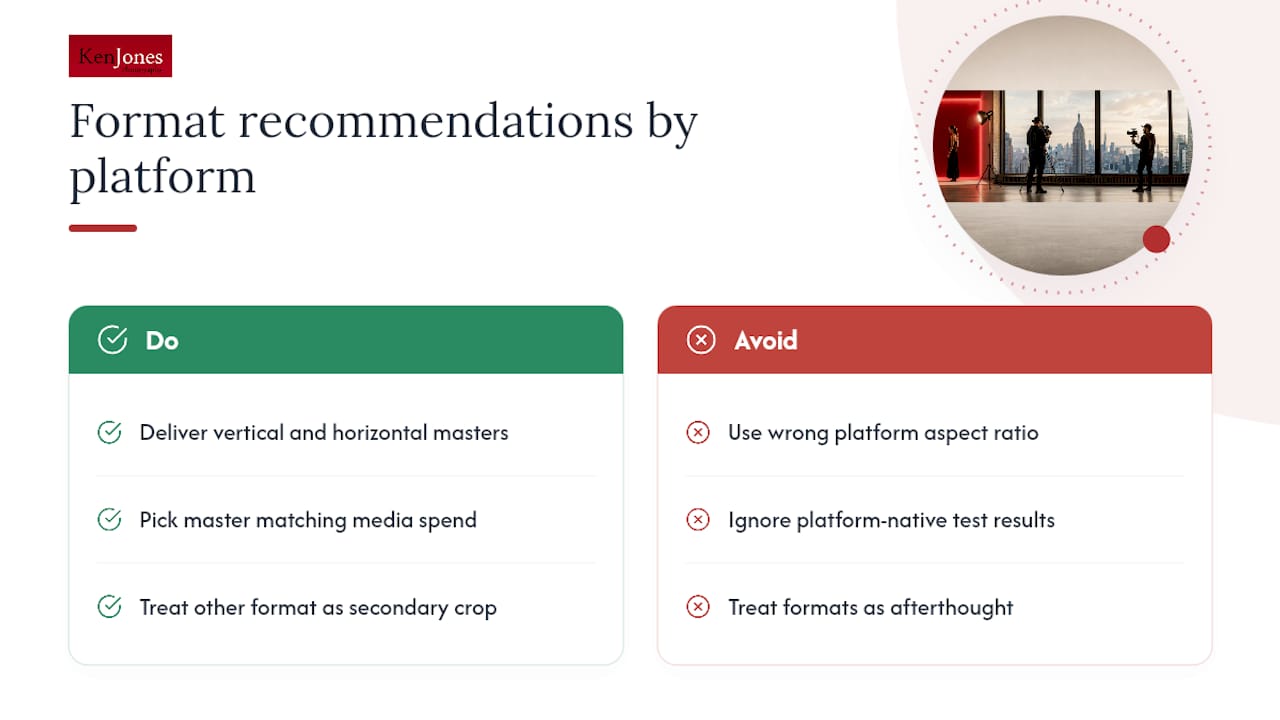
If your budget allows it, deliver both a vertical and horizontal master from the same shoot day. If it doesn’t, pick the master that matches where the majority of your media spend and audience attention actually lives, and treat the other format as a secondary crop rather than an afterthought.
Production and Composition Tips for Vertical Video
Shooting vertical well takes different instincts than shooting horizontal. Here’s the framework we run on set:
- Frame for the top third. Keep eyes and faces in the upper portion of the frame, and leave the bottom third open for captions, CTAs, or platform UI overlays that will sit on top of your footage anyway.
- Skip the lateral moves. Hard side-to-side camera moves feel cramped in a narrow frame. Vertical pans, slow push-ins, and slides read much cleaner.
- Lead with the hook, not the logo. You’ve got roughly two seconds before a thumb decides whether to keep scrolling, so open on the most interesting frame, not a brand card.
- Prioritize clean speech over broad audio design. Most vertical content gets watched with sound on but low volume, or with captions instead of sound entirely.
- Decide upfront: native capture or a planned crop. If the content is a single-subject, direct-to-camera piece, shoot native vertical. If it’s part of a bigger production with a horizontal master, plan your crop path before you roll.
Pro Tip: Adobe’s own workflow guidance recommends building a dedicated vertical sequence in your editing project rather than trying to reformat a horizontal timeline at the end. It saves hours and keeps your captions from drifting off frame.
Production and Composition Tips for Horizontal Video
Horizontal footage gives you room to work, but only if you use that room deliberately.
- Stage subjects with the rule of thirds. Wide frames invite dead center staging by default. Push your subject slightly off-center and let the background do some work.
- Control your background actively. A wide frame shows more of the room, which means more chances for a stray exit sign or a coworker walking through a corporate headshot session. Scout the frame edges, not just the center.
- Shoot extra tight coverage on purpose. If there’s any chance this footage gets recut into a vertical clip later, capture close-up alternates of your key subject so you have something usable inside a 9:16 crop.
Lighting for wide scenes usually means a slightly larger key light or moved-back placement to cover more ground evenly. One setup often does double duty for both orientations. Raise the key light a touch and adjust camera-to-subject distance, and you can shoot both a wide horizontal master and tight vertical inserts without resetting your lighting kit between takes.
How to Decide: a Quick Pre-Shoot Checklist
Before you book a crew or a studio day, run through this:
Pre-shoot planning:
- What device will most of your audience use to watch this? Mobile changes everything.
- Which platform is the primary destination, and which are secondary?
- What’s the KPI? Completion rate favors vertical; watch-time and search favor horizontal.
- Does the budget support a dedicated vertical shoot, or does it need to come from a horizontal master?
On-set rules:
- Mark vertical-safe zones with tape or a monitor guide so your DP can see the future 9:16 crop while shooting horizontal.
- Shoot extra close-up coverage of your main subject as insurance.
- If vertical is the priority deliverable, capture it natively rather than planning to crop it in post.
Post-production workflow:
- Keep a high-resolution master (4K where possible) so you have cropping room later.
- Build separate vertical sequences in your editing project instead of reformatting a finished horizontal timeline.
- Standardize your export presets so every deliverable matches platform specs without guesswork.
| Decision factor | Choose vertical | Choose horizontal |
|---|---|---|
| Primary platform | TikTok, Reels, Shorts, Stories | YouTube long-form, website, OTT |
| Content type | Single subject, direct to camera | Multi-subject, landscape, cinematic |
| Viewing device | Mobile, one-handed scrolling | Mixed devices, often larger screens |
| Repurposing need | Standalone social asset | Needs to yield vertical cutdowns later |
Ken Jones’s Real-World Lessons: Examples, Mistakes, and Quick Fixes
A few years back, a beauty brand booked us for what they described as a “quick product video” and only mentioned during setup that half the footage needed to run as Instagram Stories ads. We’d already blocked the shot as horizontal. We caught it early enough to add a second vertical pass with tighter framing on the product, but it cost us an extra hour we hadn’t budgeted, and the client hadn’t budgeted for it either.
The mistake wasn’t shooting horizontal. It was not asking where the video was actually going to live before the lights were even set. Now it’s the first question we ask on every video call, before we ask about talent, wardrobe, or location.
The fix is cheap and simple: one lighting setup, adjusted slightly higher, covers both orientations if you plan for it. Shoot your wide horizontal coverage first, then reset for tight vertical inserts of the same subject before you strike the set. It adds maybe 20 minutes to a shoot day and saves an entire reshoot.
Craft Vs Platform: Where I Land on the Debate
Format should shape creative direction from the first planning call, not get bolted on during editing. A brand chasing short-term reach will lean vertical and native-social every time, and that’s fair. But a brand building long-term recognition, an executive portrait library, a fashion editorial, a corporate video library, needs footage that still holds up in five years on a bigger screen. My rule for marketing teams: decide the primary platform before you book the crew, not after you see the footage. Reshoots cost more than planning ever does.
— Ken
How Ken Jones Photography Can Help With Multi-Format Video
If you’re planning a shoot that needs to work across TikTok, a website hero, and everything in between, that’s a production planning problem, and it’s the kind of problem we solve daily at Ken Jones Photography. Rather than booking separate crews for a “social version” and a “real version,” one production day at FultonStudio in the Financial District can cover both native vertical and horizontal masters, with lighting, creative direction, and coverage planned around your actual distribution list from the start.

When you send us a brief, tell us your primary platforms, your KPI, and whether you need standalone vertical content or a horizontal master with vertical cutdowns. We’ll come back with a lighting and coverage plan, along with retouching and delivery built around your file needs. Explore our video production work or look at how we handle combined photo and video days, then reach out to book a production date.
Sources
For more on the data behind format choice, see This Way Up’s mobile video study, Buffer’s vertical video ad tests, and Grabyo’s guide to vertical production. For visual storytelling structure, this guide to visual storytelling is a useful companion read.
- This Way Up: The Effectiveness of Mobile Vertical Video Marketing
- Does Vertical Video Make a Difference? We Spent $6,000 on Tests to Find Out
- What Is Vertical Video Production? A Definitive Guide | Grabyo
- Adobe: Vertical videos
FAQ
Why Is Horizontal Video Still So Popular?
Horizontal remains the standard for YouTube, web embeds, and streaming because it matches how those platforms and most screens are built, and it gives editors more room for graphics, group shots, and wide compositions.
Should Iphone Video Be Shot Horizontal or Vertical?
Shoot vertical if the footage is going straight to TikTok, Reels, or Stories, and shoot horizontal if it’s headed to YouTube, a website, or anywhere widescreen viewing is expected; matching the destination platform matters more than the camera default.
Why Do People Respond So Well to Vertical Video?
Vertical video matches how people naturally hold their phones, which removes friction from watching. Research covering thousands of viewers found mobile vertical video ads produced higher completion rates and stronger engagement than horizontal video on the same devices.
Is a Typical YouTube Video Horizontal or Vertical?
Standard YouTube long-form uploads are horizontal at 16:9, though YouTube Shorts uses vertical 9:16, so the right answer depends on which part of the platform you’re producing for.
Can I Just Crop a Horizontal Video Into Vertical?
You can, but it usually looks like an afterthought. Production guides recommend treating vertical as its own deliberate format with its own framing and graphics rather than a crop of a horizontal file, especially for anything client-facing.