
DaVinci Resolve wins for color-led finishing and budget-conscious editing thanks to its free tier and $295 one-time Studio license. Adobe Premiere Pro wins for teams locked into After Effects, Frame.io, and multi-editor pipelines that need predictable handoffs. If your work straddles both worlds, test a hybrid cut-in-Premiere, finish-in-Resolve workflow before you commit a whole production to either one.
TL;DR:
- Resolve’s free version covers most professional needs, with the Studio upgrade costing a one-time $295, making it more cost-effective long-term.
- Resolve excels in color grading and finishing with unique node-based workflows, while Premiere offers better ecosystem integration with Adobe apps like After Effects and Frame.io.
- Round-tripping between Resolve and Premiere often requires native rebuilds of titles and effects, necessitating careful project management and reference exports.
- For solo colorists or budget-conscious projects, Resolve is ideal, but teams already using Adobe’s suite benefit more from Premiere’s seamless integration.
- Learning either app typically requires at least 20 to 40 hours of hands-on practice, with real project testing being the fastest way to assess suitability.
Table of Contents
- DaVinci Resolve vs Premiere: The Quick Comparison
- What Are the Real Feature Differences Between DaVinci Resolve and Premiere?
- How Much Does Each Editor Actually Cost Over Time?
- How Do the Two Editors Fit Into a Real Post Pipeline?
- Which Editor Fits Your Type of Work?
- How Long Does It Take to Learn DaVinci Resolve or Premiere?
- Field Notes From an NYC Production Studio
- Getting the Right Editor Off the Ground
- Need Production Support Beyond the Edit Bay?
- Sources
- FAQ
DaVinci Resolve vs Premiere: The Quick Comparison
I’ve watched editors burn a week of prep time picking the wrong app for the wrong job, so let’s get the essentials on the table first.
DaVinci Resolve ships with a fully functional free edition. No watermark, no meaningful export cap. Blackmagic Design sells DaVinci Resolve Studio as a one-time $295 license that unlocks noise reduction, neural-engine tools, and multi-GPU support. It runs on Mac, Windows, and Linux, which matters more than people think if your studio has any Linux render nodes in the mix.
Adobe Premiere Pro lives inside Creative Cloud. Adobe prices the single-app plan at roughly $22.99 a month in the US, with the full Creative Cloud bundle costing more but folding in After Effects, Audition, and Frame.io. Premiere runs on Mac and Windows only.
Here’s the breakdown that actually drives most decisions:
- Cost model: Resolve is free-to-Studio one-time purchase. Premiere is subscription, forever.
- Platform: Resolve runs on three operating systems. Premiere runs on two.
- Standout strength: Resolve wins color and finishing. Premiere wins Adobe ecosystem integration.
- Best fit: Resolve suits solo colorists and budget-tight productions. Premiere suits agencies already living inside Adobe’s suite.
Statistic Callout: Run the math over three years. A single Resolve Studio license costs $295, period. Premiere’s single-app plan at $22.99 a month typically adds up to roughly three years of subscription cost before you touch a single plugin. That gap alone has pushed a lot of freelance colorists I know toward Resolve as their primary finishing tool.
What Are the Real Feature Differences Between DaVinci Resolve and Premiere?
The marketing copy makes both apps sound like they do everything. On a real timeline, the differences show up fast.
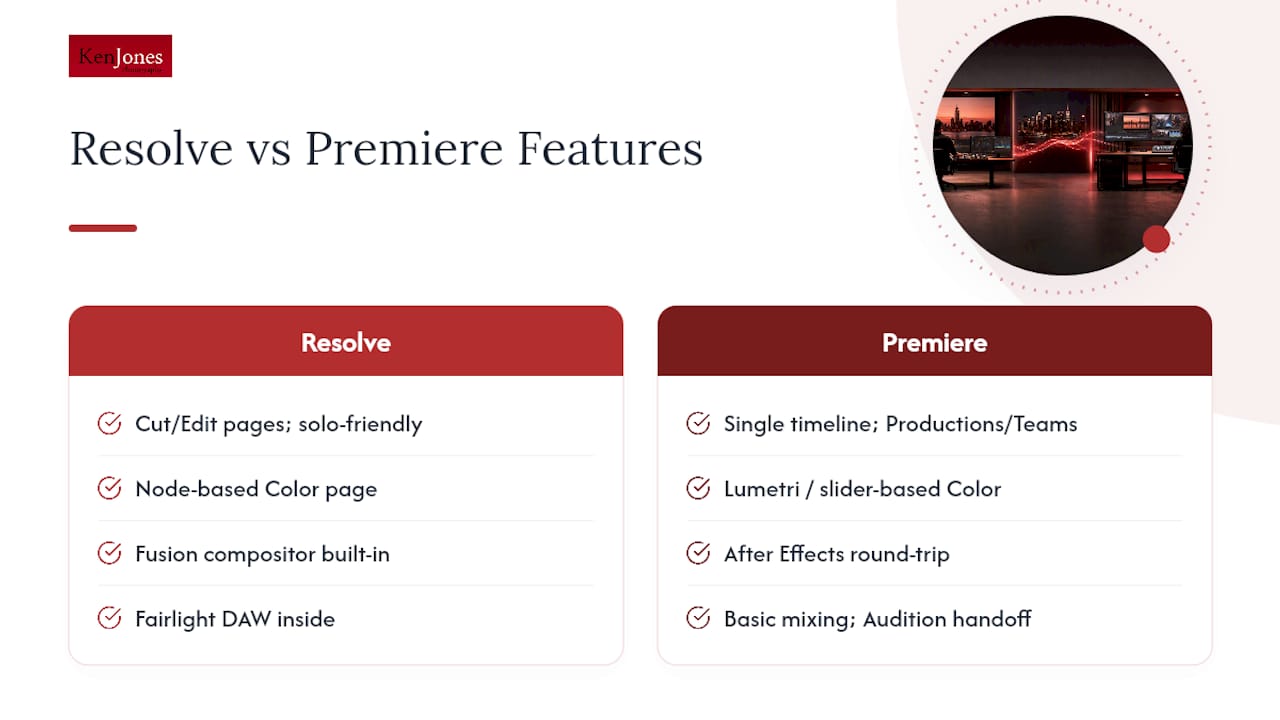
Editing. Resolve splits work across dedicated pages: Cut for quick assembly, Edit for detailed timeline work. Premiere keeps everything on one timeline and leans on Productions or Team Projects when multiple editors touch the same cut. If you’re solo, Resolve’s page system feels like overkill at first and then becomes second nature. If you’ve got three editors cutting different scenes of the same project, Premiere’s collaboration tools are more mature.
Color. This is where Resolve pulls ahead, and it’s not close. The Color page uses a node-based structure, meaning you build a grade as a chain of discrete operations you can reorder, isolate, or bypass individually. Premiere’s Lumetri panel and its newer Color Mode (still labeled beta in recent builds) work more like stacked sliders. For a simple look, either works fine. For a complex grade with power windows, qualifiers, and multiple grading passes, node-based thinking saves real time. Independent comparisons consistently flag Resolve’s finishing tools as the stronger environment, while crediting Premiere for smoother interoperability with the rest of Adobe’s suite.
VFX. Resolve has Fusion built in, a full node-based compositor living inside the same project file. Premiere relies on After Effects through Dynamic Link, which is powerful but means round-tripping between two separate applications. For a shot with heavy compositing, Fusion keeps everything in one place. For motion graphics templates and a deep plugin ecosystem, After Effects still has the edge.
Audio. Fairlight is a genuine digital audio workstation sitting inside Resolve, with bus routing and mixing tools that rival dedicated audio software. Premiere handles basic track and clip mixing well enough for most projects, then hands off to Audition when you need real audio repair.
AI and automation. Resolve Studio adds neural-engine features like AI-assisted noise reduction, facial recognition for organizing footage, and speed warp for retiming. Premiere’s generative and AI tools lean toward content creation and, notably, strong speech-to-text and auto-caption features that a lot of caption-heavy creators find decisive.
Performance. Resolve handles native Blackmagic RAW with less transcoding friction. GPU acceleration matters enormously in both apps, but Resolve tends to lean harder on GPU horsepower for real-time color work.
Pro Tip: Before switching your primary editor, import a real client project (not a demo file) and play back the heaviest timeline you have on both apps, on the exact machine you’ll be editing on. Codec handling and GPU load reveal themselves fast under real footage; they hide under demo reels.
How Much Does Each Editor Actually Cost Over Time?
Sticker price tells you almost nothing here. Total cost of ownership tells you everything.
Resolve’s free tier covers a genuine chunk of professional work, but certain delivery specs push you into Studio territory, including some codec exports, noise reduction, and multi-GPU rendering. Once you need those, it’s a single $295 payment, not a recurring bill.
Premiere’s math depends on which plan you pick:
- Single-app plan: About $22.99 a month, roughly $276 a year.
- All Apps (Creative Cloud) plan: Costs more monthly but bundles After Effects, Audition, Photoshop, and Frame.io access.
- Plugins and add-ons: Both apps have a plugin market, but Premiere users tend to accumulate more paid extensions because the ecosystem is bigger.
Statistic Callout: A solo creator running Resolve Studio pays $295 once and owns the software indefinitely. The same creator on Premiere’s single-app plan pays that amount back in roughly a year, then keeps paying every year after. Over a three-year horizon, case-based production reporting shows Resolve Studio covering an entire in-house pipeline, native raw through Fairlight audio, for less than one year of a Premiere subscription plus round-trip plugin costs.
A small agency juggling rotating freelancers often lands on Premiere anyway, because most freelance editors already know it, and retraining costs more than the subscription. A one-off feature post job, by contrast, almost always favors the one-time Resolve Studio license.
How Do the Two Editors Fit Into a Real Post Pipeline?
Adobe built Premiere to sit at the center of a suite, not stand alone. The link to After Effects, Photoshop, Audition, and Frame.io removes friction the moment your project needs motion graphics, image retouching, or client review links. If your studio already runs on Creative Cloud for other work, that integration has real value, and it shows up as saved hours, not just convenience.
Resolve takes the opposite approach: it tries to keep the entire finishing chain, color, audio, and visual effects, inside one project file. That reduces handoffs, but it also means you’re leaning on Blackmagic Design’s own tools rather than a broader plugin economy.
The round-trip between the two apps is where good intentions go to die. XML and AAF exports carry picture and basic audio reliably, but titles, certain effects, and most third-party plugins do not survive the trip. The safe pattern, confirmed across multiple production guides, is a one-direction conform: cut and lock your timeline in one app, then export a reference movie and conform in the other for finishing only.
Here’s the checklist I’d run before trusting a hybrid handoff on a paying job:
- Lock the timeline completely before exporting. No “just one more trim” after the XML goes out.
- Export both an XML/AAF and a full-resolution reference movie, so you can manually match anything that breaks.
- Rebuild titles and heavy effects natively in the receiving app rather than trusting auto-conversion.
- Verify audio levels and sync on the first and last ten seconds of every reel before calling the conform done.
Pro Tip: Always render a burned-in timecode reference file alongside your round-trip export. When an effect doesn’t survive the handoff, that reference is the only fast way to rebuild it without re-watching the entire cut.
Which Editor Fits Your Type of Work?
Different jobs call for different tools, and pretending otherwise wastes money and time.
- YouTube and solo creators: Resolve’s free tier covers most needs. Switch only if you rely on Premiere’s speech-to-text captioning or need specific Adobe assets.
- Indie features and color-led projects: Resolve Studio, for native raw handling and finishing tools that don’t require a plugin.
- Agencies and multi-editor teams: Premiere, because interoperability with After Effects and existing templates usually outweighs the subscription cost.
- Colorists and finishing houses: Resolve is close to the industry standard here. Test any switch on a non-critical project first, since a full team transition eats real time.
How Long Does It Take to Learn DaVinci Resolve or Premiere?
Expect 20 to 40 hours of hands-on work to get comfortable with either app’s basics, and well over 100 hours before you’re genuinely fast at advanced color or audio work in either one.
The fastest path isn’t tutorials, it’s a real project. Cut the same 3 to 5 minute sequence in both apps, then compare your export times and final quality. Start with Blackmagic Design’s own documentation for Resolve and Adobe’s help center for Premiere; both are more current than most third-party tutorial channels.
Here’s a self-test you can finish in one afternoon:
- Import the same footage into both apps and build a rough cut.
- Apply one grading pass and one basic audio mix in each.
- Export the final file and compare render time, file size, and how much manual correction each grade needed.
Field Notes From an NYC Production Studio
A few years back, a client came to us mid-project having cut half their brand video in Premiere, then decided the color needed a more serious pass than Lumetri could deliver on deadline. We ended up conforming into Resolve for the grade, and the handoff cost almost a full day rebuilding titles that didn’t survive the XML export. That’s a day nobody budgeted for.
The biggest mistake I see is switching NLEs mid-post without planning for it. The second most common mistake is under-budgeting for Studio-only features, teams assume the free Resolve tier covers everything, then discover noise reduction or multi-GPU rendering needs the $295 license two days before delivery.
My rule of thumb for any client shoot: keep a reference ProRes master of the locked cut, and hang onto one working seat of whatever NLE the original edit lived in. Footage outlives software versions, and a five-year-old project file opens a lot easier when you still have the app that made it.
The safest production decision isn’t which editor is “better.” It’s picking one early, sticking with it through the finish, and keeping an exportable reference master so a client’s software preference never becomes your emergency.
When clients specifically request a different NLE than what we cut in, we export a locked reference file and full XML/AAF package, then walk them through what will and won’t survive the round-trip before they touch anything. Setting that expectation up front, drawing on the same post-production planning we use for every client deliverable, avoids the “why doesn’t this look right” call three days later.
— Ken
Getting the Right Editor Off the Ground
If you’re editing color-led work solo, start with Resolve’s free tier and upgrade to Studio only when a specific feature demands it. If you’re on a team that lives inside Adobe’s suite, Premiere’s integration is worth the subscription. Before switching either way, run the one-afternoon self-test above, confirm your camera’s codec exports cleanly, and keep an archive plan with a reference master file. If you need production support to get from shoot day to final deliverable, that’s exactly the gap a studio partner fills.
Need Production Support Beyond the Edit Bay?
Choosing between DaVinci Resolve and Premiere solves half the problem. The other half is what happens on set, before either app ever opens a project file, and that’s where Ken Jones Photography, KenJonesNYC, Ken Jones NYC, fits into the picture. The studio produces video production work for corporate, fashion, and commercial clients across Manhattan’s Financial District and beyond, and delivers footage ready for either editing pipeline your team already runs.
Whether your post team cuts in Premiere or finishes in Resolve, we build deliverables around that preference from the start, exporting clean XML packages and ProRes reference files so nothing gets lost in translation. Many productions also combine stills and motion in a single session, a workflow covered in more detail in our photo and video production guide. If your next project needs a studio that hands off cleanly to whatever NLE your editor prefers, get in touch about video production services or browse the portfolio to see recent client work in motion.
Sources
- Adobe Premiere product page — Adobe
- DaVinci Resolve vs Premiere Pro: Head-to-Head — Boris FX blog
- DaVinci Resolve vs Premiere Pro for Indie Film — Tools for Film
FAQ
Do Professionals Use DaVinci Resolve?
Yes. Colorists, finishing houses, and a growing number of indie feature productions use Resolve as their primary or secondary tool, particularly for grading and Fairlight audio work, and Blackmagic Design’s Studio license adds the professional-grade features many delivery specs require.
What Is the Best Video Editing Software?
There’s no single best editor. Resolve is the stronger pick for color-led finishing and budget-conscious creators, while Premiere is the stronger pick for teams embedded in Adobe’s ecosystem who need tight After Effects and Frame.io integration.
Which Is Easier to Learn, Premiere or DaVinci Resolve?
Most editors find Premiere’s single-timeline layout slightly more intuitive at first, while Resolve’s page-based structure takes a bit longer to click but pays off once you reach color and audio work.
Which Editor Will Be Better in 2026, Premiere Pro or DaVinci Resolve?
Neither app is broadly “better” in 2026. Resolve continues to lead on color and one-time pricing, while Premiere keeps its edge on ecosystem integration, captioning, and team collaboration tools, so the right choice still depends on the job in front of you.