
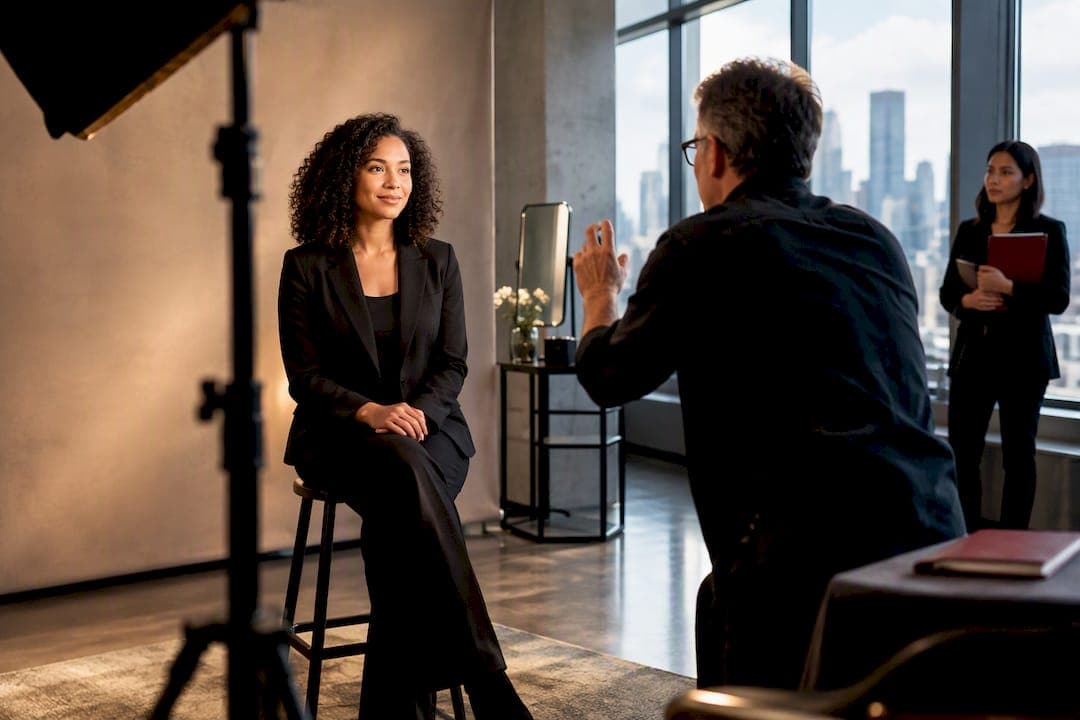
The single most effective step an HR coordinator can take before an onsite headshot session is to assign one dedicated check-in coordinator and send the photographer site photos weeks in advance. That one decision prevents most of the scheduling and space problems that derail shoot days. Studios experienced in corporate headshot work build their day-of workflow around exactly this kind of preparation, so once the room is confirmed and someone owns the check-in table, your next move is simple: send those site photos today.
TL;DR:
- Assigning a dedicated check-in coordinator and sending site photos weeks in advance prevents most scheduling and space issues during the shoot day.
- A suitable headshot space requires at least 10 by 12 feet of clear area, with a ceiling height of at least 8 feet, and access to power outlets and Wi-Fi.
- Most headshot sessions move quickly, with streamlined workflows taking 3 to 5 minutes per person, while executive portraits may take 10 to 15 minutes.
- Obtaining explicit consent with clear usage terms and a simple opt-out process minimizes legal risks and ensures employee rights are protected.
- Ensuring enough physical space, a dedicated check-in person, and completed consent forms before the shoot significantly smooths the process and reduces last-minute surprises.
Table of Contents
- On-site headshot checklist HR can use to verify the space
- Scheduling and staffing: timing templates and roles
- Legal and consent essentials HR must handle before the session
- Wardrobe and grooming rules to send employees before the shoot
- On-the-day workflow: from arrival to image delivery
- Equipment and setup basics HR should confirm with the photographer
- Production-tested lessons from onsite shoot days
- Three things I tell every HR coordinator before shoot day
- How Ken Jones Photography can run your onsite headshot day
- Sources
- FAQ
On-site headshot checklist HR can use to verify the space
Before you book a date, confirm the room can actually handle a shoot. Photographers need more physical space than most conference rooms are built for, and finding that out on the morning of the shoot is how schedules fall apart.
A workable headshot area needs a minimum footprint of roughly 10 by 12 feet, clear of foot traffic, with a ceiling height of at least 8 feet to allow the light stands and background to sit without crowding the frame. You also want a clear path of travel so employees can move from the waiting area to the check-in table to the set without cutting behind the photographer.
- Confirm at least one power outlet within reach of the shooting area, ideally two, since lighting and tethering equipment both draw from the wall.
- Ask whether Wi-Fi is available for tethered review, or plan for a hotspot as backup.
- Reserve a small table and mirror near the set for grooming touch-ups between sittings.
- Decide on a portable backdrop versus a neutral wall: a plain wall works if it is free of art, outlets, or texture; otherwise bring a backdrop.
- Request site photos and a rough floor plan at least two to three weeks before the shoot date.
Fixed conference tables, blocked outlets, and low drop ceilings are the most common surprises, and they are also the easiest to catch ahead of time with a few phone photos.
Pro Tip: Walk the room yourself with a tape measure once, even if you send photos. What looks spacious in a photo often isn’t once lighting stands and a queue of employees are in it.
After the last portrait, leave 15 to 20 minutes for the crew to break down stands, backdrop, and cables, and confirm who is responsible for returning the room to its original layout.
Scheduling and staffing: timing templates and roles
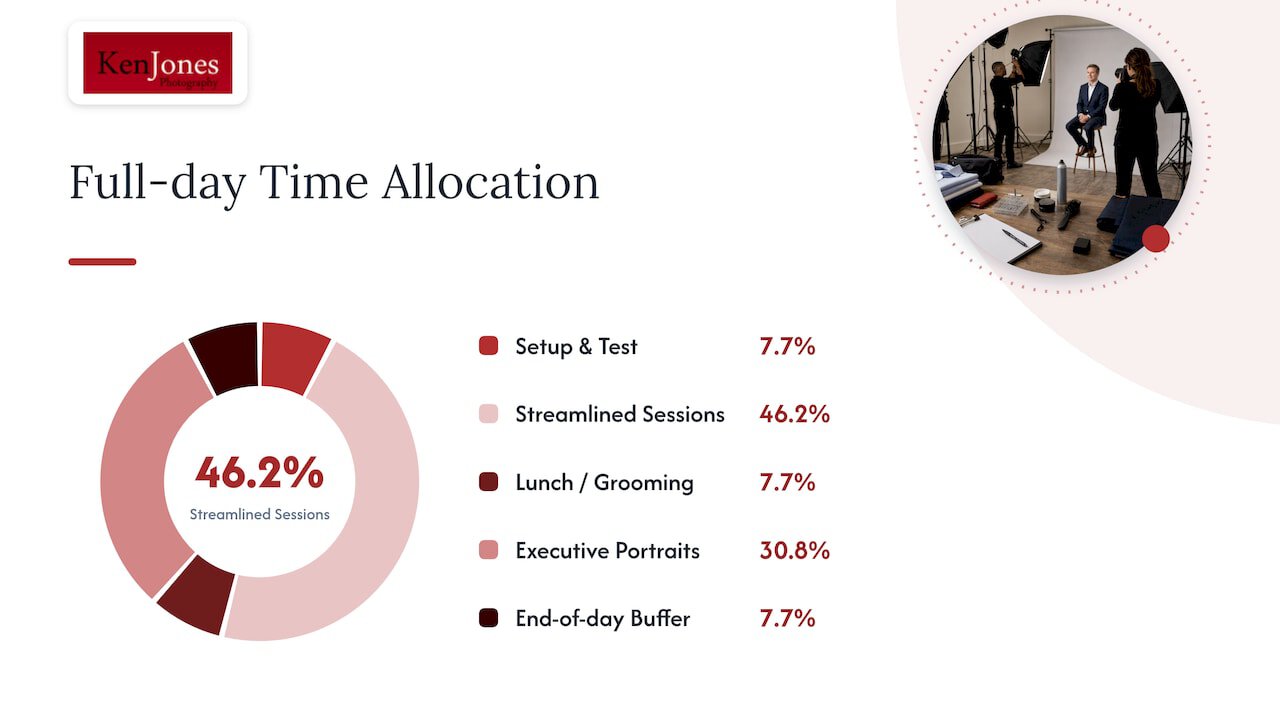
Most HR coordinators underestimate how fast a well-run headshot session moves, and overestimate how fast an unmanaged one moves. A streamlined headshot session, where the employee sits, the photographer captures a handful of frames, and the next person steps in, typically runs 3 to 5 minutes per person. Executive portraits, which often involve multiple poses, jacket on and off, or environmental backgrounds, run closer to 10 to 15 minutes.
A sample full-day schedule for a team of 40 might look like this:
- 8:30 to 9:00 AM: crew arrival, setup, and test shots.
- 9:00 AM to 12:00 PM: streamlined sessions, roughly 30 employees.
- 12:00 to 12:30 PM: lunch break for crew and reset of the grooming table.
- 12:30 to 2:30 PM: executive and leadership portraits, longer sessions.
- 2:30 to 3:00 PM: buffer for late arrivals, reshoots, or no-shows.
The one role you cannot skip is a dedicated check-in and queue manager. This person is not the photographer’s assistant handling gear. Their entire job is greeting each employee, confirming their name against the schedule, directing them to the grooming table, and cueing the next person while the current one is being photographed. A simple script works fine: “Hi, you’re up next after [name]. Feel free to check the mirror while you wait.”
Stagger employees by department in 15-minute blocks rather than calling an entire floor at once. Build in a 10-minute buffer every hour for delays, and have a plan for no-shows: a standby list of employees who can fill an open slot keeps the schedule tight. For hybrid or remote staff, block out a separate half-day or offer a follow-up date rather than trying to squeeze them into the same window as onsite teams.
Legal and consent essentials HR must handle before the session
Photography consent is not a formality you can skip because the shoot is “just headshots.” SHRM recommends obtaining explicit, informed consent that clearly states what the images will be used for, how long that consent lasts, and that the employee can withdraw it later without facing any penalty.
- State permitted uses specifically: internal directory, website, LinkedIn, printed materials, or advertising, since broad language like “any purpose” invites pushback.
- Include a clear duration, such as consent lasting for the employee’s tenure or a fixed number of years.
- Offer an opt-out path that does not require employees to justify their decision or single themselves out.
- Keep consent forms separate from other HR paperwork so employees are not signing away image rights buried inside an unrelated document.
Consent has to be genuinely voluntary. SHRM’s guidance on employee photo use notes that state right-of-publicity and privacy laws vary, and that written permission is the most reliable way to reduce exposure when images are used for commercial or promotional purposes. Store signed forms in your HRIS system with a timestamp, so you have an audit trail if a question comes up years later.
A documented, opt-out-friendly consent process is the standard SHRM recommends for reducing legal exposure when using employee images commercially, which makes it worth building into your shoot-day paperwork from the start.
There is also a newer risk worth flagging to your legal team: SHRM’s deepfake policy guidance advises employers to preserve evidence, verify image metadata, and have forensic vendors pre-vetted in case an employee’s likeness is manipulated without consent. It is not a headshot-day concern in the moment, but it belongs in the same policy conversation.
Wardrobe and grooming rules to send employees before the shoot
Send a short guidance email 3 to 5 days before the shoot, not the morning of. By then, most employees have already decided what they’re wearing, and a last-minute note gets ignored.
- Solid colors photograph better than patterns; thin stripes, small checks, and busy prints tend to shimmer or distort on camera.
- Bring a spare top or a light jacket, since layers photograph well and give people a backup if their first choice looks off on screen.
- Glasses should have an anti-reflective coating if possible, or employees should bring a backup pair, since studio lighting can create glare.
- Keep jewelry minimal and avoid anything that catches light aggressively, like large hoop earrings or shiny lapel pins.
- Basic grooming: hair styled as usual, light makeup for a natural look, and a few minutes at the grooming table before stepping in front of the camera.
A short paragraph in the calendar invite works better than a long PDF nobody opens: list the appointment window, the location, and a one-line wardrobe reminder. For detailed pre-session guidance on wardrobe, posing, and lighting, you can link employees directly to a prep guide instead of writing your own from scratch.
Always build in room for religious, cultural, or accessibility-related clothing and grooming needs. Headscarves, turbans, and other religious garments are simply part of how someone presents professionally, and no wardrobe guidance should imply otherwise. If an employee uses a wheelchair or has mobility needs, confirm the set height and background allow for a seated portrait without extra maneuvering.
On-the-day workflow: from arrival to image delivery
The flow of the day determines whether you finish on time or spend the afternoon apologizing to executives whose calendars just got tighter. Here is the sequence that keeps things moving:
- Employees check in at the coordinator’s table, confirm their name against the schedule, and are directed to the grooming area.
- While waiting, they touch up hair, adjust collars, or check makeup in the mirror set up nearby.
- The photographer calls the next person, and the shoot itself takes just a few minutes for streamlined portraits or longer for executive sessions with multiple looks.
- Images are reviewed on a tethered screen, letting the employee and photographer confirm the shot works before moving on.
- The employee steps away, the coordinator cues the next name, and the cycle repeats.
Streamlined sessions move fast, often three or four frames and done. Executive sessions run longer because they usually involve a jacket-on and jacket-off option, sometimes an environmental background, and more back-and-forth on pose.
Tethered review, where the image appears on a monitor during the sitting, has a real practical benefit beyond convenience. Photographers who use it report fewer post-shoot retouch requests because the subject already chose the version they liked while still in the chair. HR can help keep this efficient by discouraging long debates at the monitor: a quick thumbs-up and move on keeps the line from backing up.
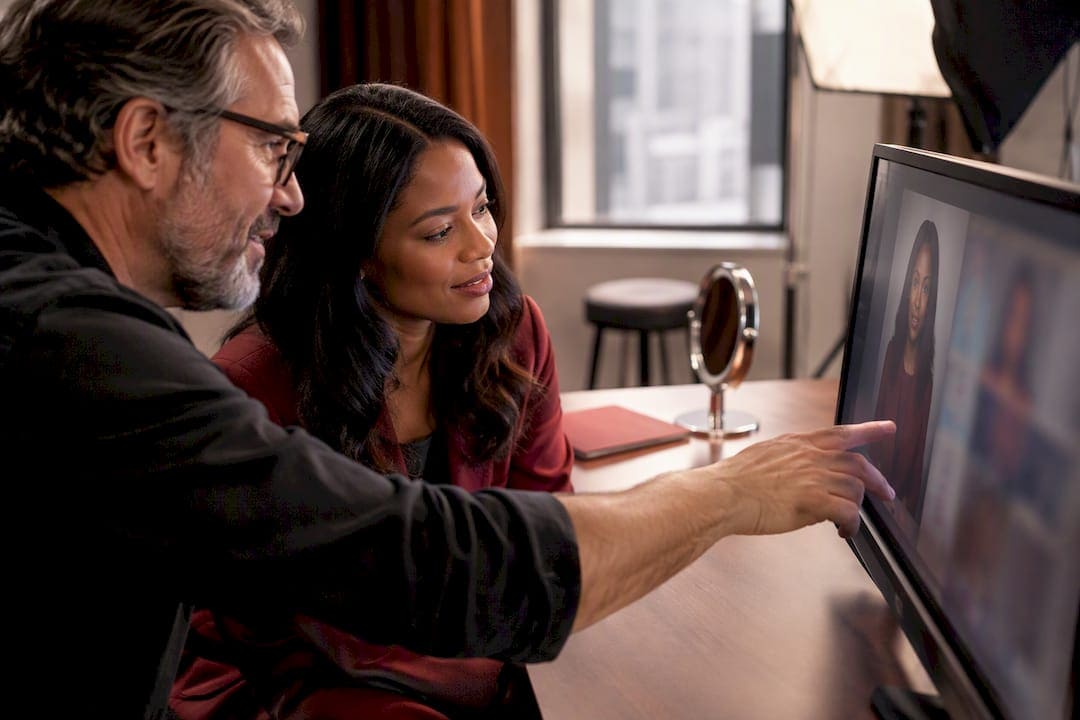
Pro Tip: Tell employees in advance that they’ll get to see their photo on screen before it’s final. It reduces anxiety and speeds up decision-making once they’re actually in the chair.
Ask your photographer upfront what turnaround to expect. Retouching and final delivery timelines vary by studio and by the size of the group, so get that number in writing rather than assuming. Before the crew leaves, walk the room together and confirm cables are coiled, furniture is back in place, and nothing was left behind. For a fuller sense of what a session actually looks like from arrival to wrap, this walkthrough of a typical corporate headshot session covers what photographers expect from the space and from you.
Equipment and setup basics HR should confirm with the photographer
You don’t need to understand lighting ratios to plan a good shoot day, but a few basic questions will save you from surprises. Ask what backdrop the photographer plans to use and confirm it will be wrinkle-free and neutral in color, since a distracting or dated background undercuts otherwise good portraits.
Lighting for headshots is almost always soft and diffused rather than harsh and direct. That typically means softboxes or umbrellas rather than a bare flash, because diffused light is more forgiving on skin tone and reduces harsh shadows around the eyes and jaw.
- Confirm the photographer is bringing their own light stands, softboxes, and backdrop stand rather than expecting the room to already have equipment.
- Ask about power needs specifically: how many outlets, what amperage, and whether extension cords will be taped down for safety.
- Confirm a backup plan if the venue’s Wi-Fi is unreliable, since tethered review depends on a stable connection.
- Ask whether natural light near a window is being used as a backup source, and if so, confirm the room has consistent light throughout the day rather than shifting with cloud cover or the sun’s angle.
Natural light can work for a casual, editorial-style headshot, but a controlled studio setup gives more consistent, repeatable results across a large group, which matters when you need forty employees to look like they were shot under the same conditions.
Production-tested lessons from onsite shoot days
On one recent onsite day, a team of 25 employees came through in 3.5 hours, largely because check-in, grooming, and pacing were handled by someone other than the photographer. That kind of timing is only possible when someone owns the queue full-time. This case example from a company headshot day breaks down what that pacing actually looked like in practice.
The recurring problems are rarely about lighting. They’re almost always physical: a conference table bolted to the floor that eats up half the usable space, no mirror anywhere near the shoot area, or the only accessible outlet sitting behind a locked supply closet. Every one of these is fixable with a site photo and a five-minute phone call two weeks ahead of time, and unfixable if discovered the morning of.
Before booking any photographer for an onsite session, ask three questions: what is the turnaround time for final images, do they offer tethered review, and what is included in retouching. A studio that reserves a grooming table and requests a check-in contact before the shoot is signaling they’ve done this enough times to know what breaks a schedule.
Three things I tell every HR coordinator before shoot day
I’ve shot headshot days in conference rooms with gorgeous views and absolutely no floor space, and in windowless rooms that turned out perfect once we brought our own light. The room rarely surprises me anymore. What surprises coordinators is how much smoother everything runs once three things are locked down: enough physical space, one person dedicated to check-in, and signed consent forms filed before the first photo is taken.
Executive schedules are the hardest part to manage, not the photography itself. Give yourself buffer time around senior leadership, and the rest of the day tends to take care of itself.
— Ken
How Ken Jones Photography can run your onsite headshot day
Planning all of this yourself is doable, but it’s also where most of the day-of stress comes from. Some photography studios handle onsite corporate headshot days with production support built in: tethered review on-site, a grooming table and touch-up supplies, retouching, and a defined delivery timeline, so your team gets a finished, consistent set of images without your staff troubleshooting cables and outlet locations.

What that looks like in practice:
- A pre-shoot site review based on your photos or floor plan to flag space issues before the crew arrives.
- Tethered shooting so employees see their portrait and approve it on the spot.
- A dedicated grooming station with mirror and touch-up basics included in setup.
- Consistent retouching across the full team so every headshot matches in tone and quality.
If you’re planning a session for your team, get in touch through Ken Jones Photography to talk through your space, your headcount, and your timeline before you lock in a date. You can also browse the studio headshot portfolio to see how sessions of different sizes have come together.
FAQ
What is the 20-60-20 rule in photography?
Definitions vary depending on the source, but it is not a standard, universally recognized rule in professional headshot production. If a vendor references it, ask them to explain specifically what it means for your shoot rather than assuming a fixed industry definition.
How much does a professional headshot typically cost?
Pricing depends heavily on the studio, group size, and whether the session includes retouching or usage rights, so there is no single flat rate across the industry. Ken Jones Photography quotes pricing based on the specifics of each session, available on request through the studio’s contact page.
What colors should I avoid for a headshot?
Avoid small patterns like thin stripes or tight checks, since they can shimmer or distort under studio lighting. Solid, mid-tone colors generally photograph more consistently than very bright or very pale shades.
Can ChatGPT give me a professional headshot?
AI image generators can produce a stylized portrait, but they are not a substitute for a photographed headshot used for verified corporate identity, executive bios, or press materials. Employers relying on generated or manipulated images should also be aware of the legal and consent issues SHRM’s deepfake guidance raises around image authenticity.