
Lookbook layout design is the studio-led process that turns a finished shoot into a sequenced, buyer-ready multi-page asset using photographic sequencing, editorial grids, and professional layout tools such as Adobe InDesign. At Ken Jones Photography, that process runs from the first moodboard call through final packaged file delivery, with every spread planned before a single frame is captured. Automation platforms like Orbitvu handle high-volume product capture efficiently, but for editorial fashion work where brand voice and visual narrative carry the weight, a full-service studio remains the more reliable route. Browse the designer lookbook portfolio to see how that process translates into finished work.
Key Takeaways
Professional lookbook layout design requires locking format, building the shot list from the grid, and requesting a packaged InDesign delivery to protect every future edit.
| Point | Details |
|---|---|
| Lock format before layout | Print (CMYK, PDF/X, 300 DPI) and digital (RGB, compressed PDF) require different specs from the start. |
| Build the shot list from the grid | Map hero, supporting, and detail frames to specific spreads before the shoot to prevent reshoots. |
| Target 12–20 pages | Trade-focused lookbooks perform best at 14–16 spreads; under-shooting reduces buyer confidence. |
| Request packaged InDesign | Insist on a packaged .indd folder with linked files, PDF/X, and web RGB set as contract deliverables. |
| Ken Jones Photography | Offers end-to-end NYC lookbook production: creative direction, shoot, retouch, layout, and file delivery. |
Table of Contents
- What does professional lookbook layout design involve from start to finish?
- How do you choose and brief a NYC studio for your lookbook?
- What layout rules make a lookbook feel premium?
- How do print and digital formats change your layout decisions?
- What does a NYC lookbook production timeline and budget look like?
- What files and proofing steps should you request from your studio?
- Full-service studio vs. in-house automation: which is faster?
- Ken Jones Photography: a NYC lookbook shoot and what it taught us
- Pre-shoot checklist: send this to your studio before the shoot
- What most brands get wrong about lookbook production
- Ken Jones Photography handles lookbook production end to end
- Sources
- FAQ
What does professional lookbook layout design involve from start to finish?
A studio-produced lookbook moves through six distinct phases, and each one has a clear deliverable that the client signs off on before the next begins.
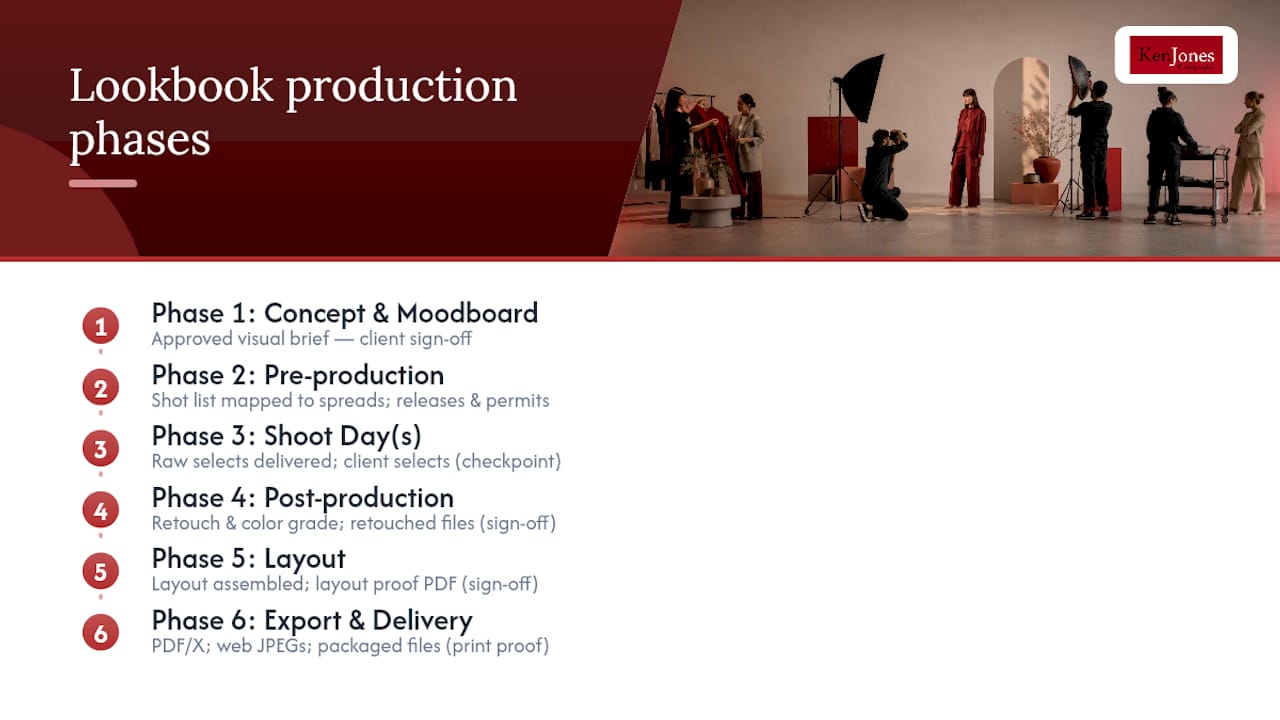
Phase 1: Concept and moodboard. The studio and brand align on visual direction, color palette, and editorial tone. Deliverable: an approved visual brief.
Phase 2: Pre-production. Shot list, casting, location scouting, and styling coordination. The shot list is built directly from the intended layout grid, not written after the fact. Deliverable: confirmed shot list mapped to spreads, signed model releases, location permits.
Phase 3: Shoot day(s). Studio or location capture with lighting setups matched to the layout’s hero, supporting, and detail frames. Deliverable: raw selects delivered to the client for review.
Phase 4: Post-production. Image selection, retouching, and color grading. Deliverable: retouched TIFF or high-resolution JPEG files, color-graded to a consistent profile.
Phase 5: Layout. Spreads, pagination, typography, and captions assembled in Adobe InDesign. Deliverable: layout proof PDF for client review.
Phase 6: Export and delivery. Print-ready PDF/X and web-optimized RGB PDF or JPEG set, plus a packaged InDesign folder with all linked files. Deliverable: final packaged files.
A stepwise production plan that runs from visual brief through distribution reduces downstream reshoots and keeps scope predictable. Sign-offs at the visual brief, final selects, retouch round, layout proof, and print proof stages are the five checkpoints that prevent last-minute surprises.
How do you choose and brief a NYC studio for your lookbook?
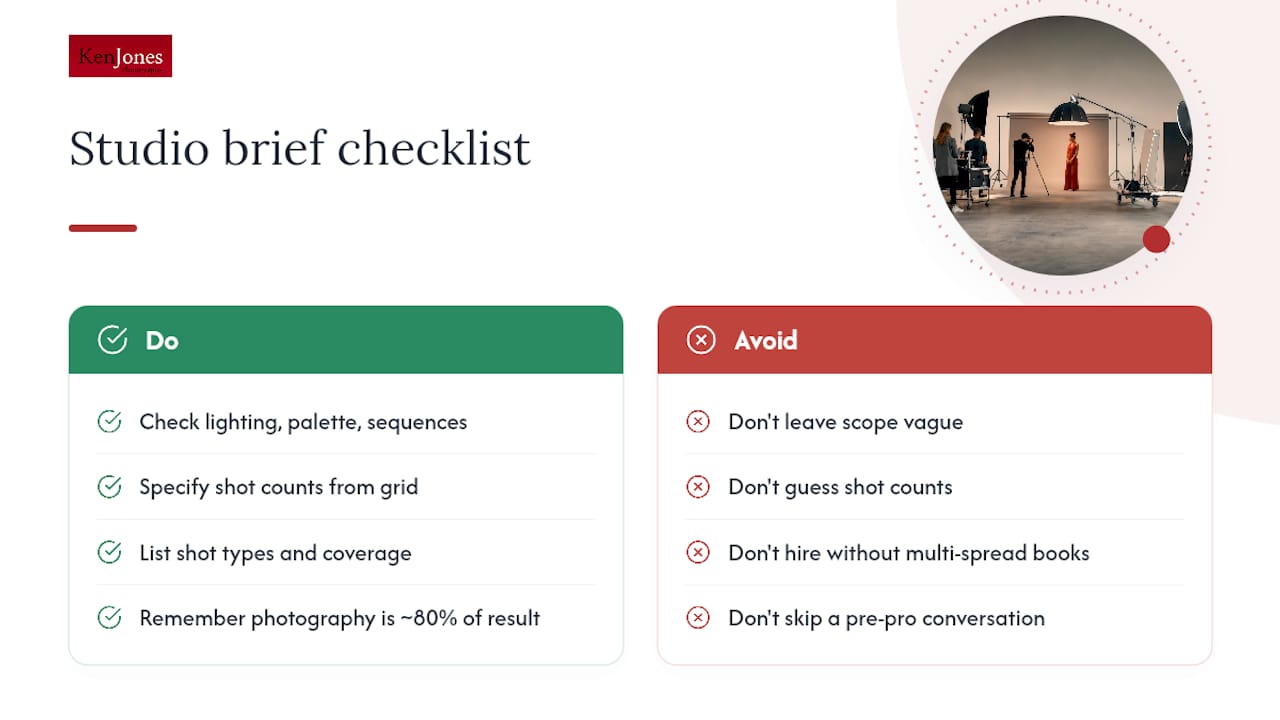
Portfolio cohesion is the first filter. Look for consistent lighting temperature, a predictable color palette across both studio and location work, and evidence of multi-spread sequences rather than isolated campaign singles. A photographer who can show you a finished 16-spread book is a fundamentally different hire from one whose portfolio is all individual hero frames.
When you write your visual brief, include the number of hero spreads, supporting pairs, detail crops, and index pages the layout requires. That count comes from the grid, not from a general sense of “we need a lot of options.” MadeGoodDesigns notes that photography accounts for roughly 80% of a lookbook’s result, which means the brief has to specify shot type and coverage before the studio can price the job accurately.
Contract scope items to insist on: number of retouch rounds, deliverable file types (packaged InDesign with linked files, PDF/X, web RGB), usage and licensing terms, and the proofing cadence. Vague scope on any of these is where budget overruns start.
Pro Tip: Build the shot list from the layout grid, not the other way around. If a spread calls for a full-bleed hero on the left and a vertical detail pair on the right, the shot list needs to specify those exact frames. Discovering that gap on layout day costs far more than a 30-minute pre-pro conversation.
What layout rules make a lookbook feel premium?
Design in spreads, not single pages. A reader experiences a lookbook as two-page units, and a layout that ignores that reads as a catalog, not an editorial asset.
Set a consistent column grid in Adobe InDesign’s master pages. A 12-column system gives you the flexibility to run a full-bleed hero, a 2-column text block, or a 3-image detail grid from the same underlying structure without rebuilding the page each time. Generous margins and white space are not wasted real estate; they signal confidence in the imagery and give buyers’ eyes a place to rest between spreads.
Alternate full-bleed hero spreads with quieter detail spreads to control rhythm. A trade-focused lookbook typically runs 12–20 pages, with 14–16 spreads representing the sweet spot for buyer attention. Pacing matters: open strong, build through mid-book, and close on a spread that reinforces the collection’s identity.
What ruins buyer-readability:
- Inconsistent type sizes across spreads
- Competing typefaces (limit to two families maximum)
- Full-bleed images on every spread with no breathing room
- Captions that fight the image rather than support it
- Color grading that shifts noticeably between spreads
A single spread that pairs a full-bleed location hero on the left with a tight vertical detail shot on the right, separated by a thin margin and a single-line caption in a light sans-serif, communicates more about a garment than three pages of product copy. The restraint is the message.
How do print and digital formats change your layout decisions?
Format choice affects every downstream spec decision, so lock it before layout begins.
| Factor | Digital | |
|---|---|---|
| Color space | CMYK | RGB |
| Resolution | 300 DPI minimum | 300 DPI optimized |
| Bleed | 0.125 in. on all sides | None required |
| Export format | PDF/X | PDF (RGB) or web JPEG set |
| Distribution | Physical mailing, trade shows | Email, link, platform upload |
| Interactivity | None | Hyperlinks, embedded video |
| Update cost | Reprint required | Edit and re-export |
Print spec checklist:
- Export as PDF/X-1a or PDF/X-4 from InDesign
- CMYK color space throughout; embed ICC profile
- 300 DPI for all placed images
- 0.125 in. bleed on all sides, crop marks included
- Paper and finish choice (matte, gloss, uncoated) affects how color reads; request a press proof for hero spreads
Digital tips: RGB throughout, compress images to keep the PDF under 10 MB for email delivery, design spreads with mobile viewing in mind (avoid type smaller than 10pt), and use InDesign’s interactive PDF export for hyperlinked versions. Digital lookbooks reduce distribution costs and allow rapid updates between seasons.
What does a NYC lookbook production timeline and budget look like?
| Phase | Duration | Key Sign-Off |
|---|---|---|
| Concept and visual brief | 1–2 weeks | Approved brief |
| Pre-production | 1–2 weeks | Confirmed shot list and casting |
| Shoot day(s) | 1–2 days | Raw selects reviewed |
| Post-production | 1–2 weeks | Retouched finals approved |
| Layout and proofing | 1–2 weeks | Layout proof signed |
| Export and delivery | 2–3 days | Final files delivered |
A 12–20 page lookbook produced by a full-service NYC studio typically runs 5–8 weeks from brief to delivery. Budget drivers include photographer and retouching fees, casting and model day rates, location permits, props and styling, InDesign layout and design, and printing or digital build costs. NYC day rates for experienced fashion photographers range widely depending on scope, but a realistic full-service production budget for a 12–20 page book generally falls between $8,000 and $25,000 or more, depending on cast size, location complexity, and print run.
What files and proofing steps should you request from your studio?
| Deliverable | Format | Purpose |
|---|---|---|
| Packaged InDesign folder | .indd with linked TIFFs/JPEGs | Future edits and reprints |
| Hero image PSDs | Layered Photoshop .psd | Retouching revisions |
| Print-ready export | PDF/X-1a or PDF/X-4 | Printer submission |
| Web-optimized set | RGB JPEG or PNG folder | Digital distribution |
| Color-proof PDF | Soft-proof PDF with ICC | Press color verification |
The recommended sign-off sequence is: visual selects approved, retouch round 1 completed and approved, layout proof reviewed, color proof reviewed, final export delivered. For print runs above a few hundred copies, request a physical press proof before approving the full run.
Full-service studio vs. in-house automation: which is faster?
Orbitvu’s automation workflow demonstrates what in-house capture can achieve at scale, including shooting large volumes of products per day with standardized lighting templates, AI masking, and multiple output formats from a single setup. For brands with high SKU counts and frequent catalog refreshes, that throughput is genuinely compelling.
The trade-off is brand signal. Automation excels at consistent, clean product capture. It does not replace an on-location editorial shoot where the environment, model direction, and lighting decisions build a visual narrative that buyers respond to emotionally.
When in-house automation makes sense:
- High SKU count (50+ styles per season)
- Frequent refreshes (monthly or more)
- Primary use case is e-commerce grids, not editorial spreads
- Internal team can manage the hardware and post-production workflow
When a full-service studio is the right call:
- The lookbook is the primary wholesale or press asset
- Brand voice and editorial quality are differentiators
- Location or lifestyle context is part of the story
- The team lacks in-house production capacity
Hybrid workflows are common: use automation for e-commerce product grids, then book a studio day for the editorial spreads that anchor the lookbook. Brand consistency across both outputs is what makes the two approaches work together rather than against each other.
Ken Jones Photography: a NYC lookbook shoot and what it taught us
The Fall Lookbook for CMOI, shot on location in New York City, is a clear example of what layout-first planning prevents. Before the shoot, the studio mapped every spread in the intended InDesign layout and built the shot list directly from that grid. The result was a confirmed list of hero frames, supporting pairs, and detail crops tied to specific pages, not a general “shoot everything and figure it out later” approach.
The client’s original brief had no detail crop coverage for two key pieces. That gap would have required a reshoot. Catching it in pre-production, not on layout day, saved both time and cost. The studio delivered a packaged InDesign file with all linked assets, a print-ready PDF/X, and a web-optimized RGB set.
Pro Tip: On your next briefing call, ask the studio to walk you through the intended spread sequence before the shoot. If they cannot describe the layout in terms of specific frame types, the shot list is not ready yet.
Pre-shoot checklist: send this to your studio before the shoot
- Completed visual brief with moodboard references
- Full SKU list with garment descriptions and colorways
- Sample garments confirmed and fitted on models before shoot day
- Styling notes: accessories, layering, footwear direction
- Model sizes and confirmed fittings
- Shot list mapped to spreads (hero, supporting pair, detail crop, index)
- Usage and licensing requirements in writing
- File format requests (print PDF/X, web RGB, packaged InDesign)
- Retouch round count agreed in the contract
- Proofing cadence and sign-off contacts confirmed
A fashion campaign shot list built around the layout grid is the single document that keeps the shoot, the post-production, and the layout phase aligned.
What most brands get wrong about lookbook production
The conventional wisdom says hire the photographer with the best individual images. The actual problem is almost always sequencing. A lookbook is not a collection of great photographs; it is a single visual argument made across 12–20 pages. Photographers who shoot for spreads think differently on set. They are watching for the detail crop that completes the hero frame two pages later, not just the hero itself.
The other underestimated factor is the visual brief. Brands that arrive with a clear brief, a confirmed shot list, and samples that fit the models on shoot day consistently get better layouts with fewer revision rounds. The brief is not a formality; it is the document that makes the layout possible before the shoot happens.
Ken Jones Photography handles lookbook production end to end
Ken Jones Photography covers every phase of lookbook production from creative direction and casting through studio or location capture, retouching, InDesign layout packaging, and print coordination. The fashion photography portfolio shows the range of editorial and commercial work the studio produces, and the studio rental space at FultonStudio in Lower Manhattan is available for brands that need a controlled environment for their shoot.

If you are planning a lookbook for an upcoming season, the right time to contact the studio is before the shot list is written, not after. Reach out at Kenjonesnyc to discuss your project, review the portfolio, and get a production estimate.
Sources
- How to create a lookbook for fashion (Orbitvu)
- How to Create a Fashion Lookbook That Attracts Buyers and Press: A Complete Guide for Designers in 2026 (Vistoya)
- Lookbook design: layout and photography (MadeGoodDesigns)
FAQ
What is lookbook layout design in a professional studio context?
It is the process of sequencing retouched photography into a multi-page editorial asset using tools like Adobe InDesign, with spreads, grids, and typography planned before the shoot begins.
How many pages should a fashion lookbook be?
Trade-focused lookbooks typically run 12–20 pages, with 14–16 spreads representing the most effective range for buyer attention and wholesale discovery.
What files should a studio deliver at the end of a lookbook project?
Expect a packaged InDesign folder with linked TIFFs or JPEGs, layered Photoshop PSDs for hero images, a print-ready PDF/X, and a web-optimized RGB JPEG or PDF set.
When does in-house automation make more sense than a full-service studio?
Automation works well for high-SKU, high-frequency product capture. For editorial lookbooks where brand voice and visual narrative are the primary asset, a full-service studio produces more reliable results.
How far in advance should a brand contact a NYC studio for a lookbook?
Contact the studio before the shot list is written, ideally 4–6 weeks before the intended shoot date, so pre-production, casting, and layout planning can run in parallel.