

Professional composite photography lets models and brands produce location-grade imagery entirely from studio-captured assets. The technique combines two or more photographs into a single, believable final image using Adobe Photoshop, and it’s the production method behind a large share of the lookbooks, e-commerce lifestyle shots, and ad campaign variants you see from fashion and beauty brands. When location budgets are tight, schedules are compressed, or a brief calls for multiple environments, composite photography services for models offer a level of creative control that a single-day location shoot rarely matches.
The primary use cases where compositing earns its place:
- Lookbooks and seasonal campaigns requiring the same model in two or more distinct environments
- E-commerce lifestyle images where a product or outfit needs context without a full location build
- Editorial spreads that demand a specific aesthetic unavailable at any accessible location
- Ad campaign variants where one studio capture feeds multiple platform sizes and backgrounds
- Multi-model assemblies where scheduling all talent on location simultaneously is impractical
Ken Jones Photography uses controlled studio capture paired with a dedicated retouching workflow to produce composite assets that work across all of these formats.
Table of Contents
- What is composite photography and how does it actually work?
- When should models and brands choose composite photography?
- Pre-production checklist: how to plan a composite shoot correctly
- On-set capture: matching lighting, lens, and perspective for clean composite plates
- Post-production techniques and deliverables in composite work
- Who’s on a composite shoot and what does each person do?
- What does a composite project cost and how long does it take?
- Advantages and limitations of composite photography for models and brands
- A Ken Jones Photography production lesson from a composite job
- How to hire a composite photography service: what to ask and what to avoid
- Key takeaways
- A photographer’s note on composites as a production strategy
- Ken Jones Photography: full-service composite production in NYC
- Useful sources and further reading
- FAQ
What is composite photography and how does it actually work?
Composite photography is the practice of assembling multiple source photographs into one final image that reads as a single, unified scene. The technique is not photo manipulation for its own sake. It’s a production discipline with three non-negotiable matching constraints: lighting direction, camera perspective, and lens focal length must align across every source plate. Fail any one of them and the composite will look assembled rather than captured.
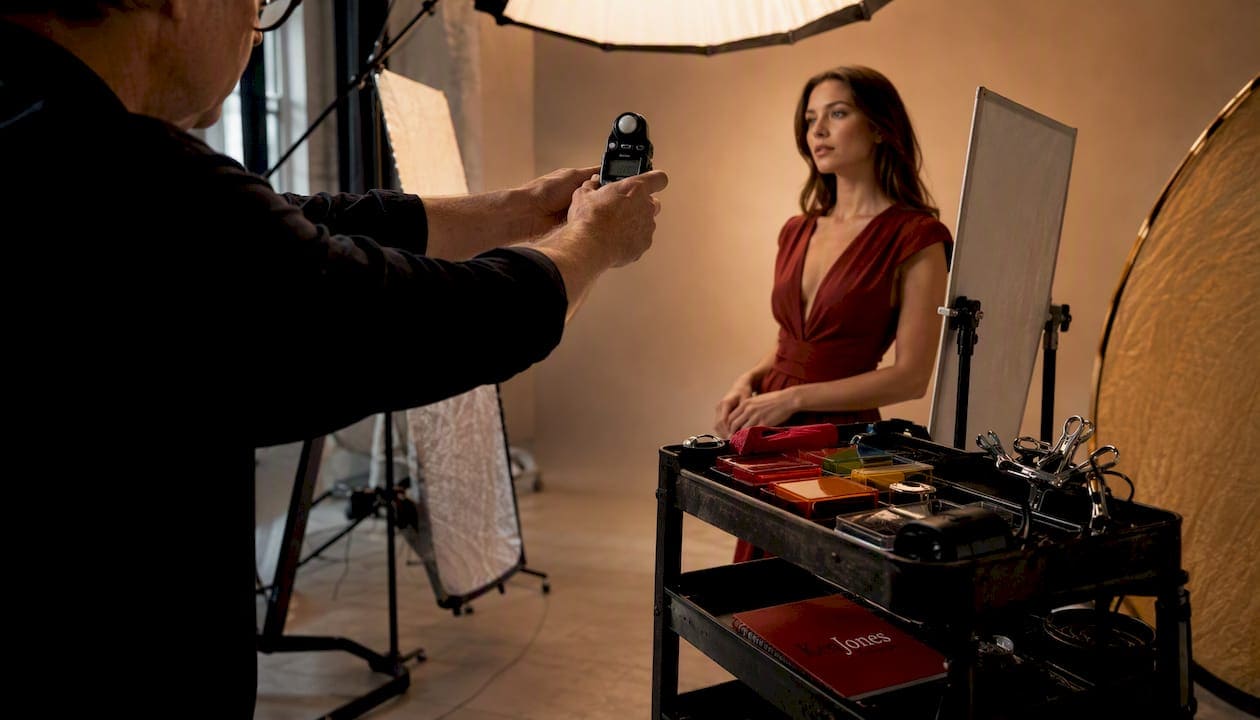
Adobe Photoshop is the industry standard for this work. Layer masks, blending modes, and clipping paths are the core tools. A layer mask lets the compositor reveal or conceal parts of any layer without permanently deleting pixels, which is why multiple clipping paths are used to isolate intricate fabric textures and embroidery without affecting surrounding areas. Color grading, shadow recreation, and perspective correction complete the assembly.
Pro Tip: When briefing a composite shoot, always specify the background environments before the shoot day. The lighting setup on set must mirror the light source direction in every background plate. Getting that wrong costs hours in post.
When should models and brands choose composite photography?
Compositing scales creative output without proportional increases in location production costs. A single clean studio capture can be placed into summer, winter, or corporate scenes later without returning to any location. That’s the core business case.
Common applications where the composite model makes clear sense:
- Lookbooks: Place the same model in a Tribeca loft, a coastal exterior, and a minimalist studio without leaving Manhattan
- E-commerce lifestyle: Show apparel or accessories in context without building a physical set
- Editorial spreads: Achieve a specific mood or environment that doesn’t exist within a day’s travel
- Campaign variants: Produce multiple background versions from one talent session for A/B testing
- Multi-model layouts: Assemble talent captured on separate days into a single cohesive group image
There are situations where compositing is the wrong call. Interactive crowd scenes, live-action continuity sequences, and shoots where authentic environmental texture is part of the creative brief all benefit from real locations. A hybrid approach, one location day combined with studio composites for additional scenes, often delivers the best balance of authenticity and cost control.
Pre-production checklist: how to plan a composite shoot correctly
Solid composites start in pre-production. The decisions made before the shoot day determine how much post-production work is needed. A well-planned brief can cut retouching time significantly; a vague one can double it.
Work through this checklist before any composite session:
- Moodboard and background selection — finalize all background environments and confirm licensing for any stock images before the shoot date
- Shot list with clean plates — document every angle needed, including empty-set clean plates for each background
- Lens and focal-length schedule — lock the focal length for each setup; switching lenses mid-session creates perspective mismatches
- Color temperature targets — set a consistent white balance for each lighting setup and photograph a gray card per background
- Model and styling continuity notes — document hair, makeup, and wardrobe state at the start of each setup
- Wardrobe and fabric tests — test how fabrics photograph against the planned backgrounds; sheer or highly reflective materials need special handling
- Permits and stock licensing review — confirm usage rights for any background plates before the shoot
Pro Tip: Always capture clean plates — an empty frame of every background setup with no talent present. They give the retoucher a reference for shadows, reflections, and edge detail that saves hours of reconstruction in Photoshop. Pair each clean plate with a white-balance card.
A detailed shot list built around the composite plan is the single most useful document you can bring to a composite shoot day.
On-set capture: matching lighting, lens, and perspective for clean composite plates
The single biggest reason composites fail is mismatched capture. Solve the technical alignment on set and post-production becomes assembly work. Skip it and post-production becomes damage control.
Practical capture checklist for composite plates:
- Lock the camera on a tripod for any setup where the model will be composited into a fixed background; consistent camera position simplifies perspective matching in Photoshop
- Use a consistent focal length across all plates for a given scene; 85mm is a common choice for fashion and beauty composites
- Photograph subjects on neutral backgrounds — white, gray, or green depending on the wardrobe colors
- Use higher shutter speeds to freeze fabric movement and capture clean edge detail in hair
- Mark strobe positions on the floor so lighting can be reproduced exactly if a setup needs to be revisited
Pro Tip: Direct models to hold consistent eye-lines and weight distribution across takes. The most common client mistake is inconsistent hair or sleeve placement between frames. When a retoucher assembles elements from different takes, those subtle mismatches become visible at the edges of every mask.
Post-production techniques and deliverables in composite work
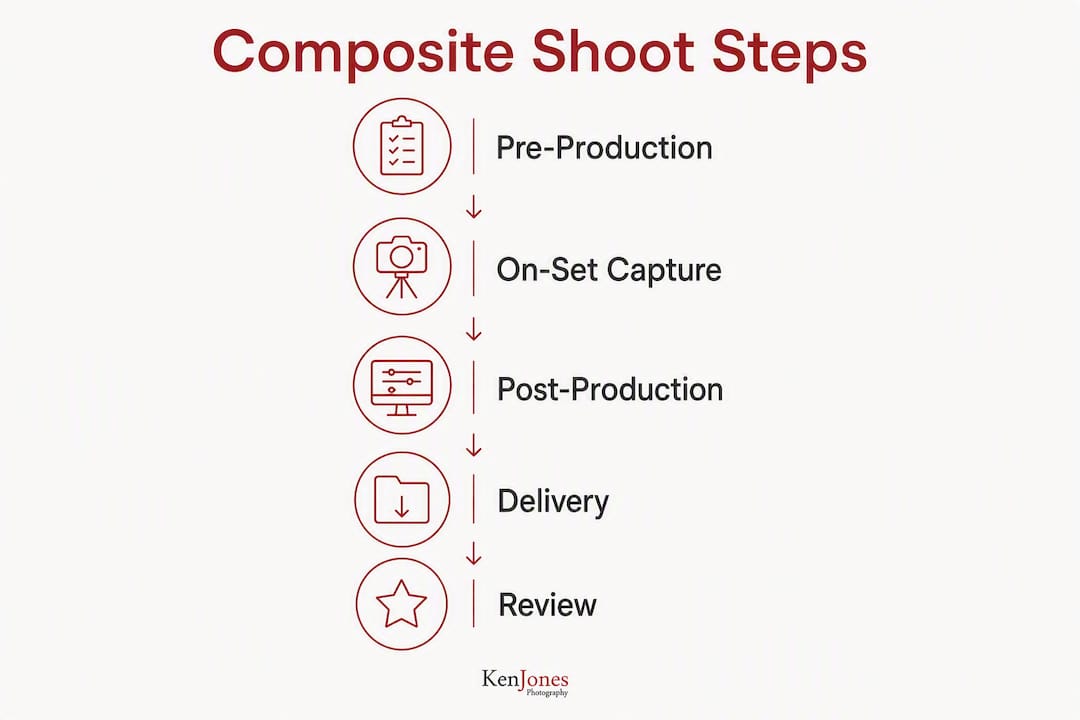
Compositing is done with layered files, typically PSD or TIFF, using masks, blending modes, clipping paths, color matching, shadow recreation, and perspective correction. The retoucher works non-destructively, meaning every adjustment is reversible until the client approves the final image.
Common techniques in a professional composite workflow:
- Layer masks for subject isolation and background replacement
- Precision clipping paths for fabrics, embroidery, and transparent materials
- Global color grading to match the subject’s color temperature to the background plate
- Shadow and reflection painting to ground the subject in the scene
- Frequency separation for skin retouching when needed, applied after compositing is complete
Typical deliverables from a composite engagement include:
- High-resolution TIFF or PSD files with editable layers
- Flattened JPG exports sized for each platform (web, print, social)
- Web-optimized versions at specified pixel dimensions
- Retouch notes and usage documentation
| Deliverable | Format | Typical Use |
|---|---|---|
| Master composite file | PSD or layered TIFF | Archive and future revisions |
| Print-ready export | Flattened TIFF | Lookbooks, magazines, large-format |
| Digital/web export | JPG | E-commerce, social media, banners |
| Web-optimized version | JPG or WebP, compressed | Page load performance |
For a detailed look at how retouching rounds and file delivery work in practice, the commercial photography retouching workflow guide covers the full process.
Who’s on a composite shoot and what does each person do?
High-quality composites are collaborative. Clients who expect a single photographer to handle capture, direction, and post-production in one day are setting up for a compromised result.
Essential roles on a composite production:
- Photographer / creative director — leads capture, sets lighting, directs talent
- Art director — holds the brief and approves setups against the moodboard
- Stylist — manages wardrobe continuity and fabric presentation
- Hair and makeup artist — maintains consistent look across setups
- Digital tech / DIT — monitors capture quality and manages files on set
- Retoucher / compositor — handles all post-production assembly and color work
- Assistants — support lighting, set management, and talent coordination
Shoot day rates and post-production retouching are typically billed separately. Clients should budget for both when requesting quotes. The retoucher’s time on a complex composite can equal or exceed the shoot day cost.
What does a composite project cost and how long does it take?
Budgets vary by complexity. The cost drivers are the number of scenes or backgrounds, retouch complexity, number of talent days, licensing costs for background plates, and the number of final image variants required.
Key cost drivers to account for in any composite brief:
- Number of distinct background environments
- Number of talent or model days
- Stock image licensing (rights-managed vs. royalty-free)
- Number of retouch rounds included
- Final image count and platform variants
| Phase | Typical Duration |
|---|---|
| Pre-production | 3–7 business days |
| Shoot day(s) | 1–2 days |
| First retouch round | 5–10 business days |
| Client revision rounds | 2–5 business days per round |
| Final delivery | 1–2 business days after approval |
Usage rights in the U.S. market are typically structured as either rights-managed (licensed for specific platforms, durations, and territories) or royalty-free (broader use, one-time fee). Always clarify usage windows and exclusivity terms before signing off on a composite brief. Background plate licensing, in particular, needs to be confirmed before the shoot, not after.
Advantages and limitations of composite photography for models and brands
Composites expand creative options and reduce location costs, but they require more planning and specialized retouching than a straightforward location shoot.
Advantages:
- Greater control over environment, lighting, and composition
- Reuse one studio capture across multiple seasonal campaigns without returning to location
- Reduced logistics: no location permits, travel, or weather dependency
- Scalable: one talent session can produce assets for multiple platforms and formats
- Consistent brand aesthetic across all campaign variants
Limitations:
- Higher pre-production planning requirement
- Specialized retouching adds cost and time
- Authenticity risk: poorly executed composites read as artificial in editorial contexts
- Some clients and publications prefer documented location shoots for credibility
A hybrid approach works well when authenticity matters. Shoot one real location day for hero images, then use studio composites for supporting campaign variants. That combination covers editorial credibility and production efficiency in the same brief. For brands thinking about how composites fit into broader visual storytelling, the reuse value of clean studio captures is one of the strongest arguments for the model.
A Ken Jones Photography production lesson from a composite job
A fashion brand came in needing imagery for three distinct environments: a rooftop terrace, a minimalist white interior, and an outdoor park setting. Booking three location days in New York City, with permits, crew travel, and weather contingency, would have taken the budget well past what the campaign warranted. The solution was a single studio day at the FultonStudio capturing clean plates against a white background, with all three background environments sourced and licensed in pre-production.
The shoot ran smoothly until the third setup. The model’s jacket was partially unbuttoned in some frames and fully buttoned in others, and the stylist hadn’t flagged the inconsistency during capture. In post, assembling the best expression from one frame with the best jacket position from another created a visible seam at the lapel edge. The retoucher resolved it, but it added a full revision round and two extra days to the delivery schedule.
Pro Tip: Assign one person on set specifically to continuity. Their only job is to photograph the model’s wardrobe, hair, and accessory state at the start of each setup and flag any deviation before the next take.
How to hire a composite photography service: what to ask and what to avoid
Hire teams who can show layered PSD examples and a clear pre-production methodology. A studio that can’t walk you through their capture-to-delivery process hasn’t done enough composite work to handle a complex brief.
Questions to ask in every proposal:
- Can you share layered PSD examples from previous composite projects?
- What file formats and resolutions are included in the final delivery?
- How many retouch rounds are included, and what’s the rate for additional rounds?
- Who handles compositing — the photographer or a dedicated retoucher?
- How do you handle lighting and perspective matching between subject and background plates?
- What’s the turnaround time from shoot day to first composite draft?
- What usage rights are included, and how are background plate licenses handled?
Red flags to watch for:
- No layered files in the portfolio or samples
- Vague descriptions of the retouch process (“we’ll fix it in post”)
- Unrealistic turnaround promises for complex multi-scene composites
- No mention of clean plates, color matching, or lighting continuity
- A single person handling capture, compositing, and creative direction without support
Key takeaways
Composite photography services for models deliver the most value when pre-production is thorough, capture is technically disciplined, and retouching is handled by a dedicated compositor.
| Point | Details |
|---|---|
| Plan before you shoot | Lock backgrounds, focal lengths, and lighting direction in pre-production to minimize post-production corrections. |
| Capture clean plates | Empty-set plates and white-balance cards per setup are non-negotiable for efficient compositing in Photoshop. |
| Request layered PSDs | Always ask for editable PSD or layered TIFF master files — they protect your ability to revise the work later. |
| Budget for retouching separately | Compositor day rates are distinct from shoot day rates; complex composites can equal or exceed the shoot day cost. |
| Ken Jones Photography | Offers full-service studio capture, pre-production planning, and in-house retouching for composite-driven campaigns from the FultonStudio in Manhattan’s Financial District. |
A photographer’s note on composites as a production strategy
Compositing is a production strategy, not a workaround. The clients who get the most from it are the ones who treat the studio day with the same rigor they’d bring to a location shoot. In New York City, where a single location permit can run several hundred dollars and a half-day of crew travel adds up fast, the studio-first composite model makes real financial sense for brands running multiple campaign cycles a year. What I’ve seen go wrong, consistently, is clients who arrive on shoot day without finalized backgrounds. They assume the retoucher will “figure it out.” That assumption costs money and delays delivery. The brief needs to be complete before anyone steps in front of a light.
Ken Jones Photography: full-service composite production in NYC
Ken Jones Photography offers studio capture, creative direction, and in-house retouching for composite-driven campaigns from the FultonStudio in Lower Manhattan. Whether the brief calls for a fashion lookbook, an e-commerce lifestyle series, or a multi-environment ad campaign, the studio handles the full production arc from pre-production planning through final file delivery.

Services relevant to composite projects include studio rental with full production support, fashion photography and editorial work, e-commerce and product photography, and a structured retouching workflow with layered file delivery. The commercial photography portfolio shows the range of finished work across campaign and lifestyle formats.
To discuss a composite brief or request a quote, visit kenjonesnyc.com.
Useful sources and further reading
These resources back the technical claims in this article and offer deeper reading on compositing tools and workflows.
- What Is Compositing in Photography? (HowToGeek) — Clear overview of tripod use, clean plates, and the Photoshop layer mask workflow
- What Is Composite Photography and How Is It Done? (Adorama / 42West) — Step-by-step Photoshop compositing tutorial with practical technique guidance
- How Digital Composite Lifestyle Photography Works (Photograph My Product) — Production strategy perspective on planning, capture, and post workflow
- Lifestyle Composite Photography Offers Huge Savings Over Location Shooting (PUREi) — Cost-saving case for studio-first composite production
- Innovative Uses of Multiple Clipping Paths in Fashion Photography Retouching (Blogsternation) — Technical detail on clipping paths for fabric and embroidery isolation
- How to Make a Photo Composite in Photoshop (Adobe) — Adobe’s official guide to layer masks, blending, and compositing tools
FAQ
What is composite photography for models?
Composite photography combines studio-captured images of a model with separately sourced backgrounds or environments into a single final image. Adobe Photoshop layer masks and blending modes are the standard tools for this process.
How much does a composite photography project cost in the U.S.?
Costs vary by the number of scenes, retouch complexity, talent days, and background licensing. Pre-production typically runs 3–7 business days, and retouching adds 5–10 business days after the shoot day.
What files should I receive from a composite photography service?
You should receive a layered master file in PSD or TIFF format, flattened JPG exports for each platform, and web-optimized versions. Always confirm editable layered files are included before signing a contract.
Why do composite shoots require so much pre-production?
Lighting direction, lens focal length, and camera perspective must match between the subject plates and background plates. Those decisions have to be locked before the shoot day — post-production cannot fully correct mismatches made at capture.
Can Ken Jones Photography handle composite shoots for fashion brands?
Yes. Ken Jones Photography provides full-service studio capture, creative direction, and in-house retouching for composite-driven fashion and commercial campaigns from the FultonStudio in Manhattan’s Financial District.