
TL;DR:
- Your LinkedIn headshot significantly influences your professional visibility and opportunities by attracting more views, requests, and messages. Using a current, high-quality photo that accurately reflects your industry and personality builds trust and enhances discoverability. Investing in a well-composed, authentic headshot from a professional photographer or a carefully prepared DIY session is crucial for career success.
Your LinkedIn headshot is the single most influential visual element on your professional profile, and a poor one is actively working against you. Profiles with professional photos receive up to 21x more views, 9x more connection requests, and 36x more messages than profiles without them. That gap is not a minor inconvenience. It is the difference between being discovered by a recruiter and being invisible. Whether you are a senior executive in Midtown or a job seeker in Brooklyn updating your profile for the first time in three years, your headshot is doing more work than you realize. Understanding why your LinkedIn headshot is costing you opportunities is the first step toward fixing it.
Why your LinkedIn headshot is costing you opportunities
The impact of a headshot on career outcomes is mathematical, not subjective. LinkedIn’s own talent data confirms that profile photo engagement drives discoverability in ways that no amount of keyword optimization can fully compensate for. When a recruiter scans search results, your photo appears before your headline, before your title, and before your name registers consciously. A blurry, outdated, or poorly lit image signals carelessness before a single word is read.

The problem is that most professionals do not realize their photo is underperforming. An image that felt fine three years ago may now be pixelated on high-resolution screens, cropped awkwardly in LinkedIn’s circular frame, or simply no longer representative of how you look today. Outdated or poorly lit photos reduce profile views and raise immediate doubts about professionalism. That doubt is rarely voiced. Recruiters and hiring managers simply move on.
There is also a trust dimension that goes beyond aesthetics. A professional profile picture signals that you take your career seriously. It tells the viewer you understand professional norms and that you are worth engaging with. A casual selfie, a group photo with someone cropped out, or an image taken at a social event communicates the opposite, regardless of how impressive your credentials are.
What makes a LinkedIn headshot effective
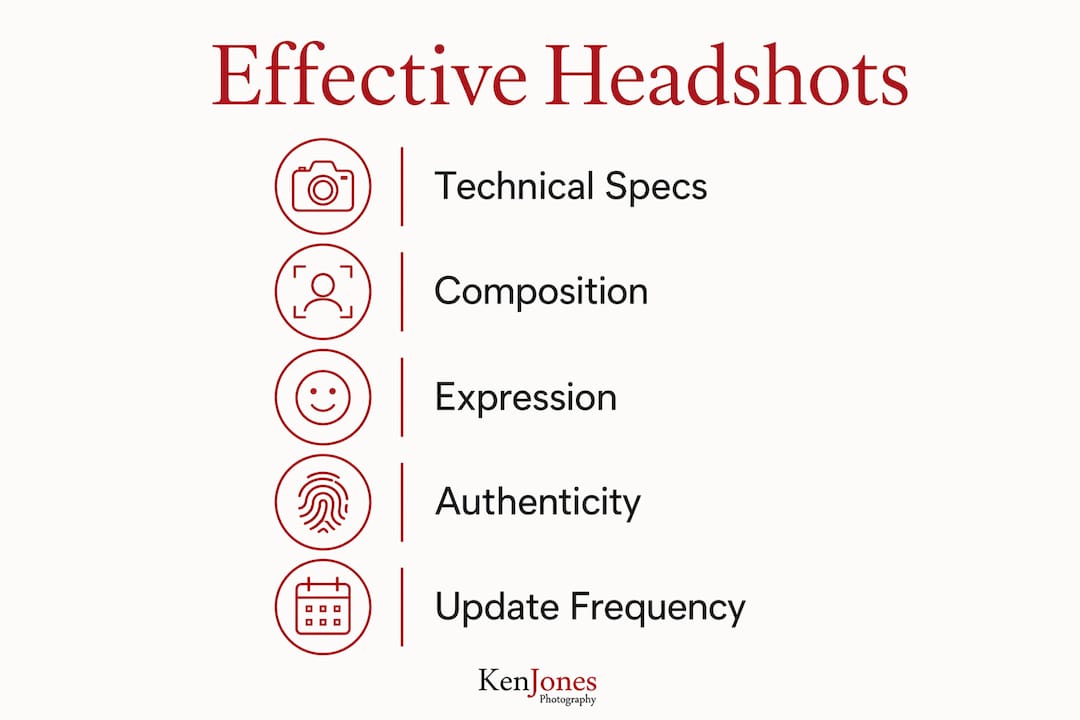
A strong LinkedIn headshot is defined by three factors: technical precision, thoughtful composition, and authentic expression. Each one matters independently, and all three must work together.
Technical specifications that protect image quality
LinkedIn displays profile photos as circular crops requiring a square, well-centered image at a minimum of 400×400 pixels, with 800×800 pixels recommended for optimal clarity. Uploading at the correct dimensions reduces quality loss from LinkedIn’s automatic compression. A photo that looks sharp on your phone may appear soft or pixelated once compressed and cropped into that circular frame. Shoot or crop your image as a square before uploading, and always use JPEG or PNG format.
Composition and framing
The standard framing for a LinkedIn headshot is a head-and-shoulders shot with the face centered and occupying roughly 60% of the frame. Your eyes should land in the upper third of the image. Avoid wide shots that push your face too small, and avoid extreme close-ups that feel confrontational. A neutral or softly blurred background keeps the focus on you without visual distraction. Solid colors, light grays, and soft environmental backgrounds all work well depending on your industry.
Expression and the authenticity factor
Expressions showing confidence and approachability are critical for positive headshot impressions. A natural, relaxed smile with direct eye contact reads as trustworthy and open. A forced grin or a stiff, unsmiling expression both undermine the effect. The goal is to look like the best version of yourself on a good day, not a version that requires significant imagination to connect with the person who walks into the interview.
One area worth addressing directly: AI-generated headshots. In 2026, several apps promise polished professional photos from a handful of selfies. The results can look technically clean, but AI-generated headshots can be perceived as inauthentic, misleading employers and damaging trust. Experienced recruiters and photographers often spot subtle inconsistencies in skin texture, lighting direction, and expression alignment that signal a manufactured image. The risk to your credibility is real.
Pro Tip: Before your shoot, study the LinkedIn profiles of five people you admire in your industry. Note what their photos have in common: background tone, expression, framing, and attire. Use those observations as a brief for your own session.
Common headshot mistakes that cost you opportunities
Most LinkedIn photo problems fall into a predictable set of errors. Recognizing them is straightforward. Fixing them requires honest self-assessment.
-
Using an outdated photo. If your headshot is more than three years old, or if your appearance has changed significantly, your photo no longer represents you accurately. A recruiter who meets you expecting one person and finds another starts the relationship with a small but real credibility gap.
-
Poor lighting. Harsh overhead light creates unflattering shadows under the eyes and nose. Flat, dim lighting produces a dull, low-contrast image. Natural window light or a well-placed softbox produces the even, flattering illumination that reads as professional. Careful consideration of lighting is often the single biggest difference between a headshot that works and one that harms a candidacy.
-
Low resolution or heavy compression. Uploading a small image and letting LinkedIn scale it up guarantees a soft, pixelated result. Always start with the highest-resolution file available.
-
Improper cropping. Cutting off the top of the head, cropping too tightly at the chin, or leaving so much empty space that the face becomes small are all common errors. LinkedIn’s circular crop compounds these problems if the original image is not properly centered.
-
Over-filtering or heavy retouching. Smoothing skin to the point of looking plastic, whitening teeth to an unnatural degree, or applying Instagram-style filters all reduce the authenticity that makes a headshot credible. Subtle retouching is fine. Transformation is not.
-
Inappropriate attire or cluttered backgrounds. Dress for the role you want, not the one you have. A busy background with visible clutter, other people, or distracting objects pulls attention away from your face and signals a lack of attention to detail.
Pro Tip: Ask a trusted colleague to look at your current LinkedIn photo and describe what it communicates in three words. If those words do not match how you want to be perceived professionally, it is time for a new photo.
How to choose between DIY, professional, and AI-enhanced headshots
The method you use to create your headshot carries its own set of trade-offs. Here is how each approach holds up under honest scrutiny.
| Method | Cost | Quality ceiling | Authenticity risk | Best for |
|---|---|---|---|---|
| DIY (smartphone) | Low | Moderate | Low | Budget-constrained professionals in casual industries |
| Professional photographer | Medium to high | High | Very low | Executives, job seekers, client-facing professionals |
| AI-generated | Low to medium | Variable | High | Not recommended for primary LinkedIn use |
DIY photos are the most accessible option and can produce acceptable results with the right setup: a clean background, natural window light, a tripod or propped phone, and a friend to help with timing. The ceiling is real, though. Without professional lighting and direction, most DIY photos look like exactly what they are. They work in a pinch but rarely compete with a professionally shot image in high-stakes industries like finance, law, consulting, or executive leadership.
Professional photographers bring three things that cannot be replicated at home: controlled lighting, creative direction, and expression coaching. Job seekers who work with professional photographers improve authenticity and receive coaching on expressions that attract employers. A skilled photographer reads how you carry tension in your face and adjusts accordingly. That coaching is often worth more than the lighting setup itself. For anyone in a competitive job market or client-facing role, the investment pays for itself quickly.
AI-generated headshots occupy a complicated space in 2026. The technology has improved significantly, but the credibility risk remains. Professional photographers and experienced recruiters evaluate credibility signals like skin texture realism and expression alignment. When those signals feel manufactured, even subtly, trust erodes. Using an AI headshot as your primary LinkedIn photo is a calculated risk. For most professionals, it is not worth taking.
For guidance on what to ask your photographer before booking a session, that preparation step alone can significantly improve your results.
Step-by-step guide to updating your LinkedIn headshot
Updating your headshot is not complicated, but it rewards preparation. Rushing the process is how most people end up with a photo they tolerate rather than one they are proud to use.
-
Research your industry standard. Spend 20 minutes looking at LinkedIn profiles of peers and leaders in your field. Note the tone, formality, and style that appears most frequently. A startup founder and a corporate attorney have very different headshot norms.
-
Plan your attire. Choose clothing that reflects the role you want. Solid colors photograph better than busy patterns. Avoid logos, distracting jewelry, or anything that dates quickly. Bring two or three options to a professional session so you have flexibility.
-
Prepare your background. If shooting at home or in an office, find a clean wall with good natural light. Remove anything from the background that would not appear in a professional setting. A plain light gray or white wall is a reliable default.
-
Focus on posture and expression. Stand or sit tall with your shoulders back and slightly angled toward the camera rather than squared directly at it. Relax your jaw. Think of something that genuinely makes you feel confident and capable. That internal state shows up in the image. For practical advice on looking natural on camera, preparation and mindset matter as much as technique.
-
Shoot more than you think you need. Take at least 50 to 100 frames across different expressions and slight position changes. The best headshots are almost always selected from a large pool of options, not from a handful of shots.
-
Edit with restraint. Use Lightroom, Capture One, or even a phone editing app to adjust exposure and color balance. Clean up any temporary blemishes. Stop before the image starts to look altered.
-
Upload correctly. Use a JPEG or PNG file. Upload at recommended LinkedIn dimensions to minimize compression artifacts. After uploading, check how the photo appears on both desktop and mobile, since the circular crop renders slightly differently across devices.
Pro Tip: Update your LinkedIn headshot every two to three years, or immediately after a significant change in your appearance or career level. A photo that no longer looks like you creates friction at every professional touchpoint.
Key takeaways
A weak LinkedIn headshot is not a cosmetic problem. It is a measurable barrier to professional visibility, connection, and opportunity.
| Point | Details |
|---|---|
| Photo impact is quantifiable | Profiles with professional photos receive up to 21x more views and 36x more messages. |
| Technical specs matter | Upload at 800×800 pixels minimum in JPEG or PNG to avoid compression quality loss. |
| Expression drives trust | Natural confidence and approachability in expression are the primary credibility signals employers read. |
| AI headshots carry real risk | Manufactured images can be detected by experienced recruiters, undermining trust before a conversation starts. |
| Update frequency counts | Refresh your headshot every two to three years or after any significant change in appearance or career level. |
What 30 years behind the camera taught me about LinkedIn photos
I have photographed executives, attorneys, founders, and creative directors across Manhattan for three decades. The most common mistake I see is not a technical one. It is that people treat their headshot as an obligation rather than an opportunity.
Clients come in apologizing before we even start. “I’m not photogenic.” “I never look good in photos.” What they mean is that they have never had someone take the time to find their best angle, adjust the light to suit their face, and coach them through the expression that actually reflects who they are professionally. That is not a personal failing. It is a production problem, and it has a production solution.
The second most common mistake is using a photo that is years out of date because the person still likes how they looked then. I understand the impulse. But when a recruiter or client meets you and the gap between your photo and your actual appearance is noticeable, the first thought is not flattering. It raises a question about judgment that has nothing to do with your qualifications.
What separates a great LinkedIn headshot from a forgettable one is almost never the camera or the studio. It is the quality of direction. A photographer who can read your face, adjust your posture, and get a genuine expression out of you in 20 minutes is worth far more than one who simply points a high-end camera at you and fires away. The importance of a good headshot is not about vanity. It is about showing up with the same professionalism online that you bring to every other aspect of your career.
The professionals I have seen get the most from their sessions are the ones who come prepared, stay relaxed, and trust the process. The ones who rush, skip the preparation, or try to control every frame usually leave with something mediocre. Give the session the same attention you would give a client meeting. The results reflect exactly that.
— Ken
Get a LinkedIn headshot that works as hard as you do
Kenjonesnyc offers professional headshot sessions from a Manhattan studio with over 30 years of experience producing images for executives, attorneys, creative directors, and corporate teams across New York City. Every session includes expert guidance on expression, posture, wardrobe, and lighting tailored to your industry and career goals. Whether you need a clean studio portrait or a more relaxed environmental headshot that reflects your personality and work context, the studio delivers results that hold up on every screen and every platform. Visit kenjonesnyc.com/headshots to explore session options and book your appointment.
FAQ
How often should I update my LinkedIn headshot?
Update your LinkedIn headshot every two to three years, or immediately after a significant change in your appearance, role, or career level. A photo that no longer accurately represents you creates a credibility gap at every professional interaction.
What resolution should a LinkedIn profile photo be?
LinkedIn recommends uploading a square image at a minimum of 400×400 pixels, with 800×800 pixels as the preferred size for optimal clarity. Uploading at the correct dimensions reduces quality loss from LinkedIn’s automatic compression.
Are AI-generated headshots acceptable for LinkedIn?
AI-generated headshots carry a real credibility risk in 2026. Experienced recruiters and photographers can detect subtle inconsistencies in skin texture and expression alignment, and a manufactured image can damage trust before a conversation begins. A professionally photographed headshot remains the more reliable choice.
What should I wear for a LinkedIn headshot?
Wear clothing that reflects the professional role you want, not necessarily the one you currently hold. Solid colors photograph better than busy patterns, and you should avoid logos or anything that dates quickly. Bring two or three options to your session to allow for flexibility.
Does a professional headshot really make a measurable difference?
Yes. LinkedIn data shows that profiles with professional photos receive up to 21x more profile views and 36x more messages than those without. That gap in engagement directly translates to fewer recruiter contacts, fewer connection requests, and fewer career opportunities over time.
Recommended
- What Is a Professional Corporate Headshot?
- Ken Jones Photography | NYC Fashion, Beauty & Commercial Photographer | Manhattan Studio Rental – 7 Questions to Ask Your Headshot Photographer
- Ken Jones Photography | NYC Fashion, Beauty & Commercial Photographer | Manhattan Studio Rental – Headshots NYC | Corporate & Executive Portrait
- How Corporate Headshot Sessions Work: What to Expect